A Deep Dive into DataGroomr, Plauti Deduplicate (formerly Duplicate Check), DemandTools by Validity, and Cloudingo*
I tested four top Salesforce deduplication tools (DataGroomr, Plauti Deduplicate (previously known as Duplicate Check), DemandTools by Validity and Cloudingo) to uncover their strengths and quirks.
My approach split the evaluation into two parts: the buying process, where I looked at pricing clarity, trial offerings, and implementation ease, and the product itself, where I gauged overall effectiveness, user interface (UI/UX), and documentation quality.
Each one of these tools is a solid performer, but I hope these findings shed light on how each tool performs across the board, offering a clear picture for anyone navigating the dedupe landscape.
What About Native Salesforce Deduplication?
In this article, we dive deep into powerful deduplication tools listed on AppExchange, but you may be wondering why bother exploring deduplication apps? After all, Salesforce has some deduplication features built in. While it is true that Salesforce has some native deduplication functionalities like Matching Rules, Duplicate Rules and Duplicate Jobs, these tools are best thought of as prevention tools. These are great for preventing duplicates from being created, but they are limited for bulk deduplication, advanced matching rules, and automated data maintenance. If you would like more information on this, please see our previous blog post on this topic.
AppExchange solutions shine with more flexible features such as mass deduplication, matching across multiple objects, customizable deduplication workflows and automation. The best practice for most companies is to use a hybrid approach – leveraging native Salesforce capabilities to stop duplicates from entering the system, and using third-party tools to clean and maintain data.
DataGroomr vs Plauti Deduplicate (previously Duplicate Check)
Out of the Gate: No Setup vs. Admin Expertise
DataGroomr kicks things off with a no/low-fuss approach. You log in, and it’s already scanning your Salesforce data for duplicates using its pre-trained machine learning (ML) magic. No need to fiddle with settings or call in a Salesforce guru.
DataGroomr’s March 2025 release doubled down on this, adding smarter AI automation and streamlined dataset management that makes it even easier to jump in and start cleaning.
Plauti Deduplicate, on the other hand, is a different approach. Built by Plauti, it’s a native Salesforce app that lives inside your org, requiring a managed package install and some configuration muscles.

While Plauti has been traditionally known for its rule-based approach toward deduplication, they now offer AI recommendations… While deduplication rules must still be configured, Plauti now offers some AI suggestions as to how these rules can be improved.
Finding Duplicates: ML Smarts vs. Rule-Based Precision
DataGroomr leans hard into machine learning, and it’s a game-changer. Trained on massive datasets, its ML models spot duplicates with high precision, with no manual if/then setup required. It’s gotten even sharper, with updates that boost matching accuracy and cut down on false positives.
Maybe you want to control your own data hygiene destiny – no problem! You can still train custom ML models by picking fields and feeding it examples, blending AI power with your unique data quirks.
Plauti Deduplicate sticks to the traditional playbook: rule-based matching. You define the rules (exact matches, fuzzy logic, whatever fits), giving you granular control. It’s powerful in the hands of a Salesforce wizard, but you should account for time to setup and maintain.
Plauti hasn’t added ML to the mix, so it’s still a hands-on affair compared to DataGroomr’s “set it and forget it” capabilities.
Merging Duplicates: Flexibility Meets Automation
Both tools let you merge duplicates, but the vibe’s different. DataGroomr’s Cleanse module shows duplicates side-by-side, letting you pick the master record, tweak fields, and merge with a click. Its 2025 updates added tag-based mass merging, making bulk cleanups easy. Plus, that undo feature is still a clutch move for inevitable “oops” moments.
Plauti Deduplicate offers robust merge rules too, with field-by-field control and cross-object support. It’s great for complex setups, but you’ll need to configure it upfront. No undo button here, though, so you’re relying on backups if things go sideways. Plauti’s merge game is still solid but hasn’t caught up to DataGroomr’s ability to automate.

Preventing Duplicates: Import Smarts vs. Real-Time Blocks
DataGroomr’s Transfer capability checks incoming CSV files against your Salesforce data, flagging duplicates before they sneak in. It’s slicker than ever, with enhanced enrichment options to update existing records instead of clogging your org with dupes. It’s all about keeping the mess out from the start.
Plauti Deduplicate counters with real-time prevention, enhancing Salesforce’s native Duplicate Rules. It can block records as they’re entered—handy for live data entry—but it needs clear rules to avoid frustrating users. Plauti’s API integrations improved, letting it sync with external systems, but it still leans on admin setup.
User Experience: Intuitive vs. Admin-Centric
DataGroomr’s interface is a breath of fresh air—clean, intuitive, and ready to roll. Log in, see your duplicates, and get to work. The 2025 updates polished this further with better dataset views and a dashboard that screams simplicity. Executives and admins alike can use it.
Plauti Deduplicate, being Salesforce-native, feels familiar to admins but clunky to others. Its UI hasn’t evolved much, and navigation can feel stuck in Classic mode. If you’re not deep in Salesforce land, it’s less welcoming than DataGroomr’s web app. For those who prefer a Salesforce interface, Plauti Deduplicate is a great option.
Pricing: Transparency vs. Mystery
Plauti’s pricing feels like a bit of a black box. You’ll still need to dig for details—tiers like Advanced, Premium, and Enterprise exist, but you can’t find this information on the pricing page. According to a blog on their page, costs depend on record volume, and it’s not all upfront. Unlimited seats sound nice, but most orgs don’t need every user merging anyway.
Bottom line: Plauti will require a sales call.
The Bottom Line
DataGroomr’s 2025 glow-up made it the go-to for fast, AI-driven deduping, no admin PhD required. Its ML smarts, slick UX, and transparent pricing scream efficiency. Plauti Deduplicate holds strong for Salesforce natives who crave control and don’t mind the setup or pricing opacity. Both get the job done, but DataGroomr’s ease and innovation edge it out for most.
DataGroomr vs DemandTools: How are they different?
Out of the Gate: Instant Action vs. Version Roulette
DataGroomr gets you going fast. Log into its web app, and it’s already hunting duplicates with pre-trained machine learning, providing no setup, no fiddling, but fast results. March 2025 updates improved things, with smarter AI that kicks in right away. It’s perfect if you want to skip the prep and dive in.
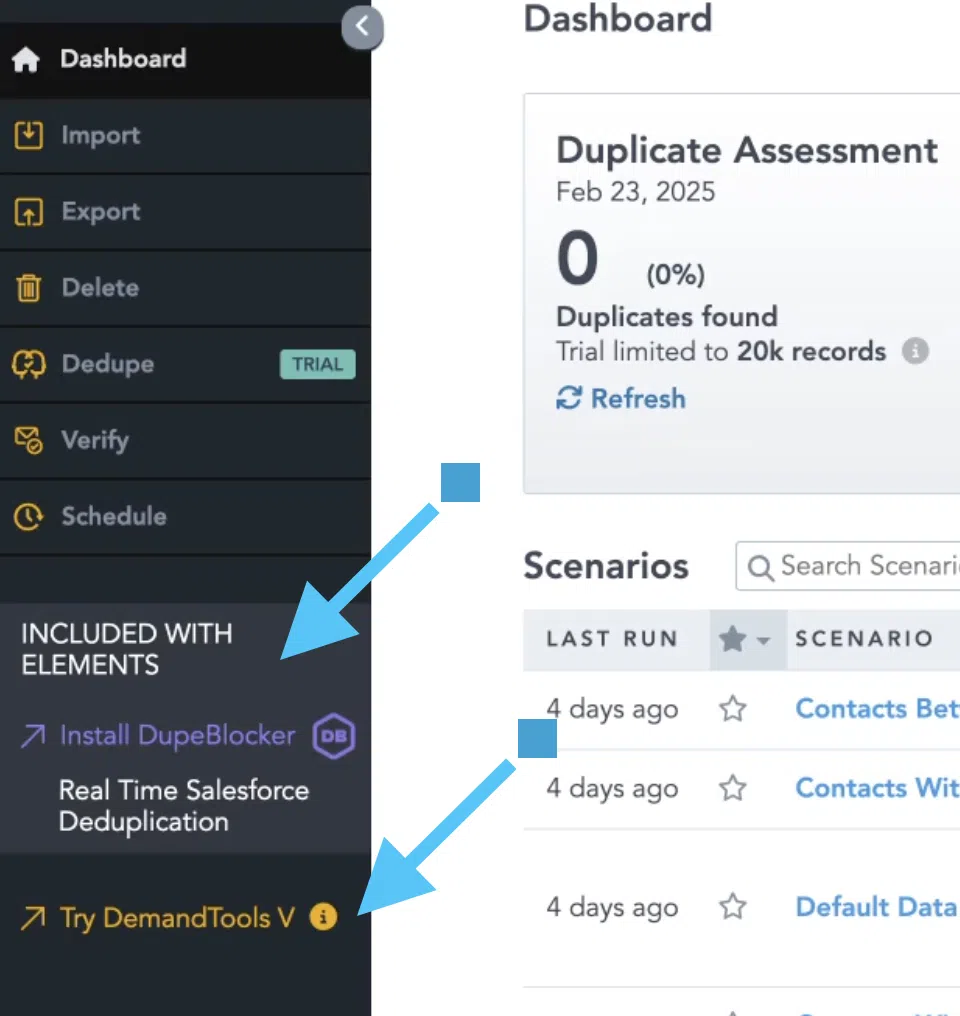
Validity offers multiple flavors of DemandTools: the Elements web app for lighter tasks, the full-featured edition for power users, and an Excel plug-in for spreadsheet fans. Each needs some setup. For example, Elements (web app) requires rule configuration. They’ve smoothed some edges in 2025, but you’re still picking a path, and it’s not always clear which fits.
Finding Duplicates: ML Brilliance vs. Rules Across Tiers
DataGroomr’s ML engine is its ace. Trained on huge datasets, it detects duplicates with high precision and keeps getting better. As of 2025, it’s sharper, with fewer misses and faster scans. You can also create and train custom ML models which you can set up in minutes. No matter your tier, you gain access to excellent machine learning.
DemandTools gets the job done, but it leans on rule-based matching, and how you use it depends on the tier. Elements offers great fuzzy and exact logic, though you’re setting it up yourself. It delivers, but there’s no true AI, and picking the right tool for the job might feel confusing without some research.

Merging Duplicates: Smooth Flow vs. Tiered Options
DataGroomr makes merging snappy: side-by-side views, pick your master, tweak fields, and done. The 2025 update added tag-based mass merging, speeding up bulk cleanups. Plus, the undo feature allows you to restore merged records (relations included) from the recycle bin for 14 days.
DemandTools’ merge game shifts depending on the version you’re using. Elements keeps it straightforward with decent field control and is relatively affordable. The full edition brings the big guns (cross-object support, bulk merging, and granular rules) for complex jobs. The Excel plug-in lets you merge via sheets, which works but feels like extra homework. No undo anywhere, so you’re banking on backups. That experience feels splintered.
Preventing Duplicates: Import Smarts vs. Scheduled Variety
DataGroomr’s Import capability scans CSV imports against your Salesforce data, catching duplicates before they sneak in. It’s preventative and a clean way to stop the mess upfront.
DemandTools handles prevention differently across its lineup. Elements offers near-real-time checks and light scheduling, but you’re configuring it. The full edition excels with robust scheduled deduping or real-time blocks if you tweak it right. The Excel plug-in flags dupes pre-import, but it’s manual and spreadsheet-bound. It’s strong once dialed in, but can feel slow among faster moving products.
User Experience: Clean vs. Cluttered
DataGroomr’s web app is intuitive, polished, and ready to roll. Log in, spot your duplicates, and start fixing. The dashboard refresh makes it even friendlier, welcoming everyone from newbies to pros. You’re prompted to train your models, and can start deduping within minutes.
DemandTools’ UX is all over the place. Elements, the web app, is simpler but still admin-heavy. The full edition’s interface is dense and functional, built for power users who don’t mind digging in. The Excel plug-in? It’s Excel. For some of us, that’s great news. But for all of us, it’s not entirely scalable.
Pricing: Clear Cut vs. Seat-Based Guesswork
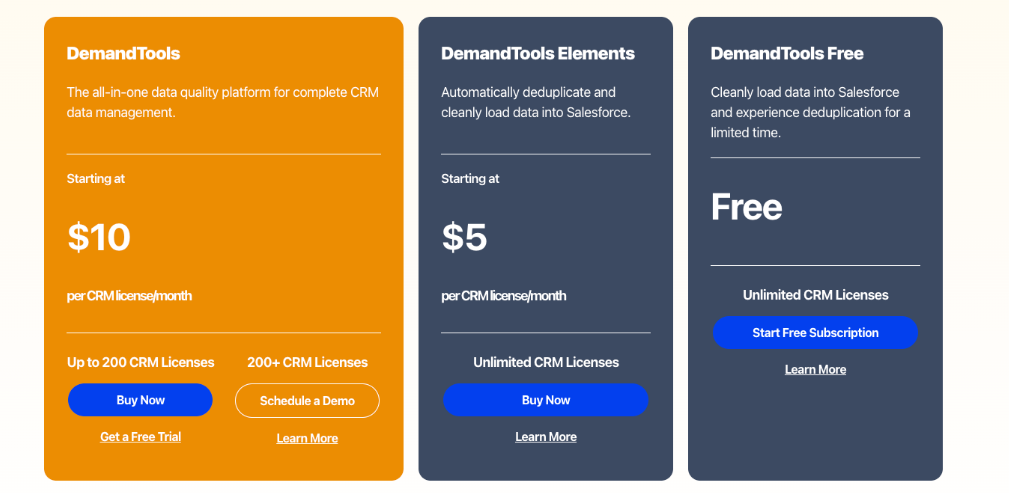
DemandTools ties costs to Salesforce seats, and only offers pricing transparency up to 200 users. If you’re a small team with a large and complex org, DemandTools might be a great fit. However, if you’re a large, fast growing organization with at least 200 Salesforce licences, you’ll be paying $6,400 for basic, and $14,700 for enterprise.
They offer an Excel plug-in, which is outcome-based pricing – but you’re living out of spreadsheets. The 14-day trial is solid but locks some features, making it hard to do a true comparison.
The Bottom Line
DataGroomr’s 2026 shine makes it the pick for fast, AI-driven deduping. You get one tool, no hassle, and tons of efficiency. Its slick UX and smart matching cut through the clutter.
DemandTools by Validity is a beast for power users, but its Elements web app, full edition, and Excel plug-in split the experience into confusing chunks—each strong, yet hard to pin down.
In the AI universe of 2026, DataGroomr takes it for most orgs, while DemandTools holds firm for admins who can handle the tier tangle.
DataGroomr vs Cloudingo* – Comparing Salesforce Deduplication Solutions
Out of the Gate: Fast Launch vs. Guided Setup
DataGroomr and Cloudingo both connect to Salesforce quickly, but the starting line differs. DataGroomr’s web app jumps right in, and its machine learning starts scanning with no extra steps needed. Its March 2026 AI tweaks make that first move even crisper, appealing if you like things ready-made.
Cloudingo requires a bit more setup. After signup, you install a native app, activate it, and let it index your data. It guides you through clearly, but it’s a few clicks more than DataGroomr’s plug-and-play style. After installing, you have to create rules before it will detect duplicates. It suits those who don’t mind a setup phase for a tailored start.

Takeaway? Both get you going; DataGroomr’s instant, Cloudingo’s deliberate.
Finding Duplicates: Shared Flexibility, Different Paths
Both tools excel at finding duplicates, offering flexible matching logic. DataGroomr uses ML, honed to catch patterns with minimal input. It’s fast and accurate, and offers you the flexibility to create and train your own models based on nuance within your org.
Cloudingo matches via rules (fuzzy, exact, your call) which you set up. You can also choose the new now includes advanced fuzzy + dynamic matching logic. You can also undo merges, which is one of their main features. It’s just as capable, but you’ll define the logic yourself. It’s a solid choice if you prefer shaping the process over letting AI take the wheel.
Takeaway? Same strength, different feels—DataGroomr’s more automated, Cloudingo’s manual.
Merging Duplicates: Core Power, Varied Flow
Merging is a strength for both, with robust rules and cross-object support. DataGroomr lays it out simply: side-by-side views, pick your master, merge away. Its mass-merge tags streamline bulk jobs, and a 14-day undo (via recycle bin, relations intact) adds a little bit of breathing room for those inevitable errors.
Cloudingo matches that power with separate convert and merge rules, styled like a spreadsheet. It handles batches and auto-conversions well, though you’ll configure each step. It’s just as effective, just less direct.
Preventing Duplicates: Overlapping Tools, Distinct Styles
Prevention is another shared win, with real-time and scheduled options. DataGroomr’s Importr module focuses on CSV imports, catching duplicates pre-entry, and 2025’s enrichment updates make it a tidy gatekeeper, which is a huge win for import-heavy workflows.
Cloudingo covers prevention comprehensively, with real-time blocking and scheduled deduplication. Once configured, it’s very comprehensive, and it can handle duplicates across various entry points (manual, imports, integrations, etc.). It’s a good match if you’re after detailed control over how and when duplicates are caught
User Experience: Smooth vs. Structured
Here’s where the experience splits. DataGroomr’s web app is clean and intuitive. You log in, spot duplicates, and act. The refresh keeps it straightforward, ideal if you value minimal friction.
Cloudingo’s interface is functional but takes some getting used to–it doesn’t offer embedded help text/documentation. Its spreadsheet layout and duplicitous navigation (like “Data Quality” vs. “Reports”) can be confusing. It works fine if you’re okay with a learning curve.

Pricing: Clear Options, Slight Edge
Cloudingo’s pricing offers three tiers: Standard at $2,500/year, Professional at $6,000/year, and Enterprise starts at $10,000/year. All have an additional $100 fee per 100,000 records over 300,000 total records for Professional and Enterprise; all plans include unlimited users and a 10-day trial with full feature access.
The Bottom Line
In 2025, DataGroomr and Cloudingo share the core dedupe functionality in their flexible matching, merging, and prevention. It’s less about what they do and more about how they feel.
DataGroomr offers a polished, low-effort experience that’s hard to beat if you want efficiency out of the gate. Cloudingo brings the same power with a customizable, structured approach that rewards those who have time to tinker. Your call depends on the interface you’re after.
Other Salesforce Deduplication Tools to Consider in 2026
The Salesforce deduplication market has expanded in 2026 with newer and emerging tools complementing established players such as DemandTools, Cloudingo and Plauti. Newer tools like Insycle, No Duplicates, and EW Dupe Finder are gaining momentum by providing more adaptable automation features, native Salesforce designs, and streamlined user interfaces that appeal to today’s Salesforce users. These solutions are often easier to set up, easier to use, and support bulk processing, which is particularly attractive to companies seeking to streamline their processes and minimize administrative burden, while retaining flexibility. This means that organizations now have a wider variety of options available to them – from highly customizable, highly administrated solutions to simpler, faster automation-first platforms.
AI vs. Rule-Based Deduplication
A key trend in Salesforce deduplication over the last few years has been the widening gap between rule-based and AI-powered solutions. Rule-based solutions are built on a set of predetermined matching rules – such as exact or approximate matches on email addresses, company name and phone number – which provides admins with greater control, but can be time-consuming to set up and maintain.
Meanwhile, AI-based deduplication relies on machine learning to automatically detect duplicate patterns, and can learn from past experience, eliminating the need to create custom rules. This allows for quicker implementation and scalability, especially for organisations without full-time Salesforce admins. But rule-based tools still excel in highly sensitive industries where control and predictability are essential. Ultimately, it often boils down to a balance between control and simplicity, with many companies preferring AI-powered solutions for their ease and efficiency, while using rules for special cases that need tight control.
Today’s Pricing and Positioning
In 2026, the cost of Salesforce deduplication software remains highly variable, and it’s important for buyers to understand providers’ sales strategies. Some vendors adopt a high-end, enterprise model offering advanced features, deep customization and higher per user or org-based pricing, while others cater to smaller teams with more user-friendly pricing and features. Moreover, pricing models vary, from per user to per record or annual flat rate, further complicating comparisons. Therefore, potential users need to consider not only the initial purchase price, but the total cost of ownership in terms of time to set up and use, as well as overall maintenance. For instance, a less expensive tool might still require substantial admin work, whereas a more expensive option might save time with automation. In short, matching pricing to team needs, tech expertise and data complexity is more critical than just looking for the lowest price.
Bringing It Together
Testing all four tools in 2026 reveals distinct fits for different teams. DataGroomr excels for large orgs with massive datasets, leveraging machine learning to master sprawling data. It’s fast, and really simple to use.
DemandTools is a great fit for smaller teams with lots of data due to its license-based pricing. It is more complex to setup and maintain than DataGroomr, so account for some dedicated implementation time, and make sure you train an expert on your team.
Plauti Deduplicate thrives with certified Salesforce teams. It will feel like a breeze for an expert admin. I can’t compare pricing, since that wasn’t available.
Cloudingo is a fine tool, but it’s pricier at its baseline than the others. It has similar setup complexity to DemandTools, so expect some implementation time, and make sure you train an expert on your team.
| Tool | Fit Guidance | Pricing Type | Price Comparison | Trial |
| DataGroomr | Great for small and large orgs but especially effective for organizations with very large datasets; record-based pricing and ML efficiency tackle big data cleaning. | Record-Based Pricing | Baseline: $1,195/year,Custom/Advanced: $2,395/year,Enterprise: $4,795/year (at 100k records, 1 seat), +$500/extra seat | Yes – full features, volume limits. 14-Day. |
| Plauti Deduplicate | Good for expert admins and certified teams; thrives with hands-on control in Salesforce-native setups. | Unknown | Tiers (Advanced, Premium, Enterprise) vary by record volume, costs not listed—requires sales call; unlimited seats. | Yes – full features, volume limits. 14-Day. |
| DemandTools | Fits small orgs with lots of data but few users; seat-based pricing keeps costs low for tight teams. | Salesforce License-Based | Basic: $2.67/mo/Salesforce licenseEnterprise: $11/mo/Salesforce licenseExcel plug-in outcome-based | Yes – limited features, limited volume. 14-Day. |
| Cloudingo | Good for mid-sized orgs seeking customization; solid flexibility without heavy admin demands. Pricey for small companies. | Instance & Seat-Based | Standard: $2,500/year,Professional: $6,000/year,Enterprise: Starts at $10,000/year, +$100/100k records over 300k. | Yes – full features, volume limits.10-Day. |
*Disclaimer: Cloudingo is a registered trademark owned by Symphonic Source, Inc. and we do not claim any rights to it, nor are we associated with Symphonic Source, Inc. in any way.