Find and merge duplicate Cases and emails and stop paying to store the same data twice.

Every Salesforce admin knows the email: Your org is approaching its storage limit. The usual reaction is to buy more storage or start deleting old records. Before you do either, look at what’s taking up space. Duplicate Cases and emails may be consuming more storage than you realize, especially when multiple tools log the same customer interactions.
These duplicates aren’t created intentionally. Email-to-Case, Service Cloud routing and sales engagement tools can create additional records automatically, sometimes duplicating email conversations and attachments. That’s why DataGroomr dedupes Cases and Email Messages out of the box, so you can clear out the bloat without losing customer history.
How Salesforce counts your storage
Salesforce meters storage in two separate pools, and duplicate Cases and emails eat into both.
- Data storage holds records. Enterprise, Performance and Unlimited orgs get 10 GB per org, plus 20 MB per user license on Enterprise and 120 MB on Performance and Unlimited.
- File storage holds files and attachments. Those editions get 10 GB per org plus 2 GB per user license.
Most records, Cases included, count as approximately 2 KB each. EmailMessage records can consume considerably more storage because their size depends on the email content. For example, a 100 KB HTML email uses about 100 KB of data storage, 50 times a typical record. Attachments and inline images add even more file storage.
So, one duplicate Case is cheap. One duplicate Case with a ten-message email thread and a few PDF attachments is not.
Where the duplicates come from
These duplicates most likely aren’t coming from your team. They’re coming from your automation.
Email-to-Case opens a new Case instead of threading the reply. Salesforce uses email headers and threading information to match replies to Cases. When that link breaks, Salesforce opens a new Case for the same issue. Common triggers include:
- Reply-all from a CC. A customer copies their manager, who replies all. Since the email never included a Salesforce thread ID, the reply email causes a new Case to be opened.
- Edited subject lines. Someone changes or deletes the subject line on a reply.
- Stripped headers. An email client or forwarding rule removes the thread headers.
- Two support addresses. The customer emails both at once, and each routing address opens its own Case.
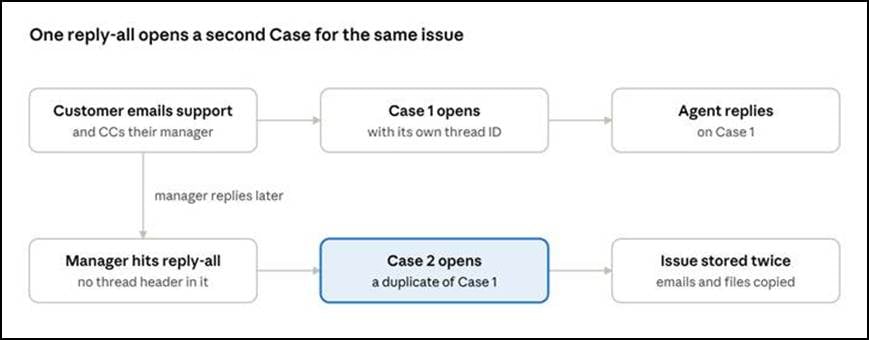
One reply-all from a CC’d manager is all it takes to open a second Case for the same issue.
Each duplicate Case then collects its own copy of the conversation: the same emails, the same attachments, stored twice.
Several tools log the same email. Sales engagement and conversation tools such as Gong, Outreach and Nooks can each log email activity in Salesforce. Depending on how they’re configured, multiple tools may capture the same email, creating duplicate records. The copies are easy to spot by eye, with the same body and the same subject except for a tool tag like [Gong Out] or [Outreach] at the start, but no native Salesforce feature finds or removes them.
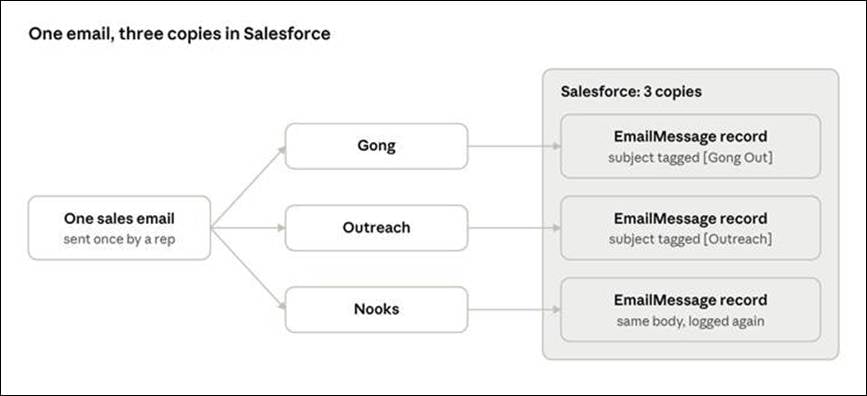
Each logging tool writes its own EmailMessage record, so one email can take up storage three times.
Old tools leave old copies behind. Switching off a tool may stop new duplicate records, but the records it previously created can remain in Salesforce and continue consuming storage.
What it costs you
Additional Salesforce storage can be expensive, although pricing varies by contract. Many of our customers report that they pay about $125 per month for each 500 MB of data storage ($3,000 per GB per year) and about $5 per GB per month for file storage. This example demonstrates how the cost of keeping duplicate records can add up quickly.
Take a 50-user Enterprise org. Its data allocation is 11 GB (10 GB plus 50 × 20 MB). Here’s what duplicates alone could cost it in a year:
| Source of bloat | Assumption | Storage used | Annual storage cost |
| Emails logged twice by sales tools | 300,000 total emails at 30 KB each, with 1/3 duplicates | 3 GB data | $9,000 |
| Email threads on duplicate Cases | 10,000 duplicate Cases, 5 emails each at 30 KB | 1.5 GB data | $4,500 |
| Attachments on duplicate Cases | 10,000 duplicate Cases, 1 MB each | 10 GB file | $600 |
| Total | 4.5 GB data, 10 GB file | $14,100 |
That’s about 40% of the org’s included data storage allocation consumed by duplicate records. If the additional usage pushes you beyond your storage limits, the cost can add up year after year. Storage is only the visible part:
- Duplicate work. Two agents can work on the same issue without knowing it.
- Inflated reports. Case volume and SLA reports count every copy.
- Mixed messages. Customers can get two different answers to one question.
- Cluttered timelines. Duplicate emails inflate activity counts and make it harder for reps to find the information they need
- Heavier sandboxes and backups. Duplicate records can also increase the volume of data copied during full sandbox refreshes and backups.
Where Salesforce’s native tools fall short
Salesforce’s duplicate management is built for Leads, Contacts and Accounts. For Cases and emails, it offers very little.
- Limited duplicate detection for Cases. Salesforce’s Case Merge feature lets agents combine up to three Cases at a time, but identifying potential duplicates generally requires manual review or additional automation. There are no matching rules on the Case object, and the Merge Cases button requires delete permission on Cases.
- Limited options for duplicate emails. Salesforce doesn’t provide the same native duplicate matching and merging capabilities for EmailMessage records that it offers for Leads, Contacts and Accounts.
- Deleting isn’t a cleanup. Mass-deleting old emails or closed Cases frees storage, but it throws away the customer history your agents and reports depend on. And it does nothing about the copy coming in tomorrow.
How DataGroomr clears it out
DataGroomr comes ready to dedupe Cases and Email Messages. There are no matching rules to write and no code to deploy.
- Matching built from your data. Add Case or Email
- Merge rules that respect Service Cloud. With one switch, DataGroomr attaches a ready-made merge rule. The surviving Case fills in any missing values from the most recently updated duplicate while preserving its existing threading information, so customer replies keep landing on the right Case. The surviving email fills its empty fields from the newest copy and leaves sent-email content alone, because Salesforce locks it.
- Noise doesn’t hide duplicates. Copies often differ only by prefixes like “RE:”, “FW:” or a logging tool’s subject tag. Add them to an ignore-words dictionary, and DataGroomr leaves them out when it compares records.
- Review first, then merge in bulk. Check a few groups, merge one and look at the result in Salesforce. Then mass-merge every group above the confidence level you choose. You can undo a merge if you need to.
- Keep duplicates under control automatically. Schedule the analysis and merge to run every night or set up a real-time trigger that catches duplicates as they arrive.
- Or just ask. The DataGroomr AI Agent can help set this up from a plain-English request, such as “Schedule a nightly analysis and merge for my Email Messages dataset.” It shows you every change and waits for your approval before saving anything.
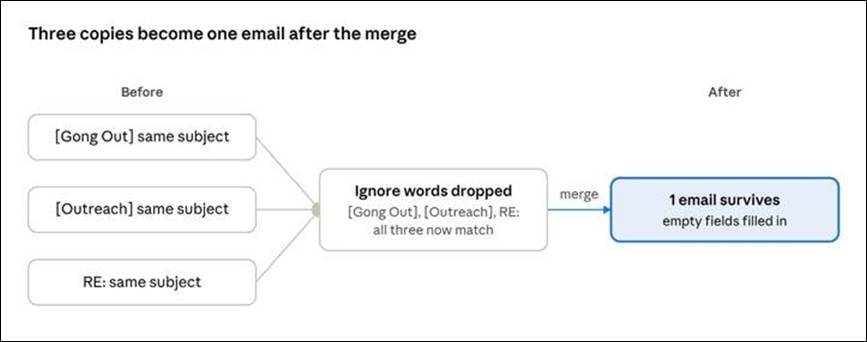
Ignore words exclude tool tags from matching, helping DataGroomr identify duplicate emails even when their subject lines differ.
How to use it
Getting started takes just a few steps. Case and Email Message deduplication is built into DataGroomr, so there’s nothing to build and no code to deploy.
- In DataGroomr, go to Setup → Objects and add Case and Email Message, with Generate merge rules switched on.
- Open each new dedupe dataset and review the duplicate groups.
- Merge one group and check the result in Salesforce.
- Once you’ve confirmed the results, mass-merge the remaining duplicate groups.
- Schedule a nightly run so the bloat doesn’t come back.
Then check Setup → Storage Usage in Salesforce to monitor the reduction in storage usage.
Less bloat, cleaner Service Cloud
Duplicate Cases and emails don’t just consume storage. They split customer history, skew your reports, and waste your agents’ time. With DataGroomr, you find these duplicates automatically, merge them while preserving valuable information and help prevent new ones from accumulating.
Case and Email Message deduplication is available in DataGroomr today.
Ready to get your storage back?
Book a demo to see how many duplicate Cases and emails are in your org. We’ll tailor the walkthrough to your Service Cloud setup and Salesforce environment. You can also start a free 14-day trial to explore the results yourself. Run your first Case and Email Message analysis in minutes. No setup, no customization, and no credit card required.
Follow us on LinkedIn, YouTube, Facebook, and X for more practical Salesforce data quality tips, product updates, and best practices.