Validate campaign members directly from the Campaign page and send only to verified email addresses.
Every bad email address comes with a cost, and it’s bigger than most marketers realize. It doesn’t just bounce. It drags down your sender reputation, skews your open and click rates, and pushes your carefully built campaigns closer to the spam folder. And in Salesforce, where campaign members flow in from web forms, list uploads, events, and integrations, invalid addresses have a way of piling up unnoticed until a send goes sideways.
That’s why we’re excited to announce a new addition to DataGroomr: a Verified Emails component for Campaigns and Campaign Members. Now you can confirm that the people in a campaign have deliverable, real email addresses before a single message goes out, without ever leaving the Campaign record.
What’s new
The new component lives directly on the Salesforce Campaign page. Open any campaign and you’ll see a Verified Emails panel that shows, at a glance, how many members have been validated. A single Verify Emails action kicks off verification for the campaign members; so the whole check happens in place, with no CSV exports, no third-party tools, and no copy-pasting lists between systems. Once members are verified, the same panel lets you Send Emails to just the valid addresses.
Email verification is most valuable when it’s part of a broader data quality strategy. Because it’s built into DataGroomr, verified email addresses work alongside deduplication, data cleansing, and validation, giving you one workflow for preparing Salesforce data before every campaign.
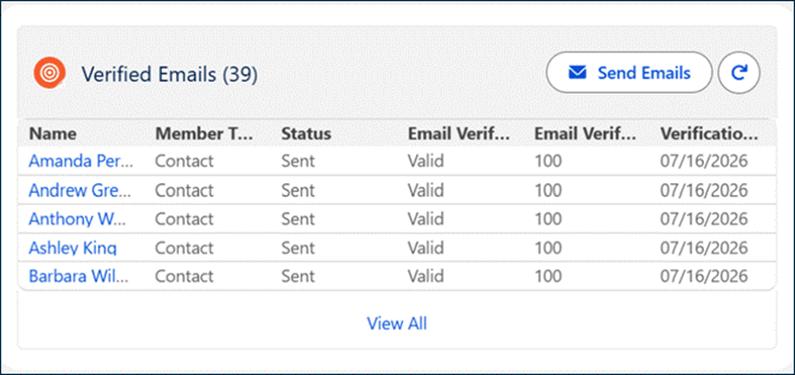
The Verified Emails panel lives right on the Campaign page, showing the validated-member count at a glance with a one-click Verify Emails action.
How to use it
There’s very little to it. The Verified Emails component ships with the DataGroomr package and sits right on the Campaign page; so there’s nothing to build and nothing to export.
- Add the Verified Emails component to your Salesforce Campaign page using the Lightning App Builder (one-time setup).
- Open a campaign and click Verify Emails to validate every campaign member in place.
- Review the results in the Verified Emails Campaign Members list view.
- Send your campaign only to verified email addresses.
- Optionally mark invalid addresses with Email Opt Out so they’re automatically excluded from future campaigns.
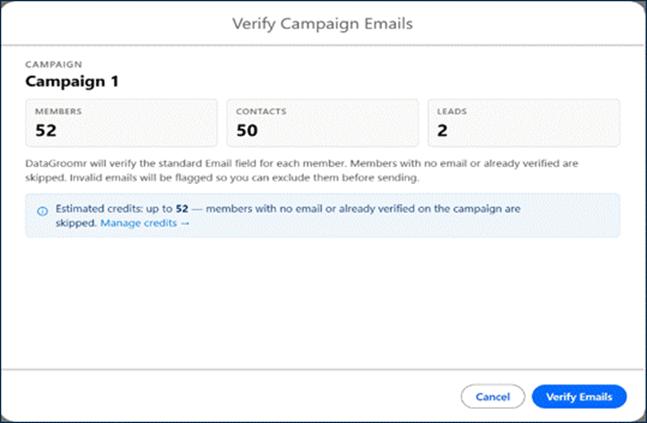
One click on Verify Emails checks every campaign member in place, with no exports and no third-party tools.
It’s the same clean-verify-send workflow your team already knows, right where your campaign already lives.
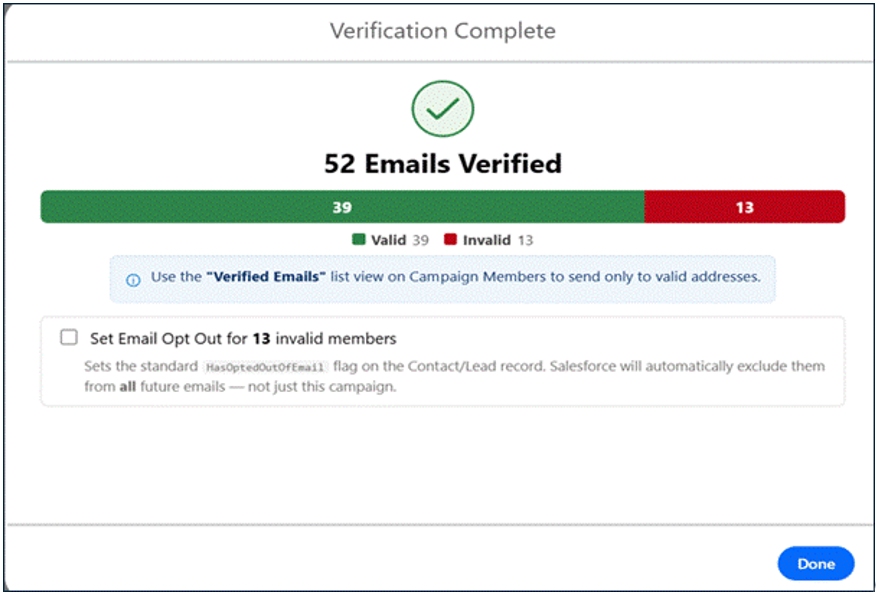
Verifying a campaign is as simple as it looks, right on the Campaign record.
Why it matters
- Ensure deliverability. Verify email addresses before every send to reduce bounces, avoid spam filters, and improve inbox placement.
- Protect your sender reputation. Removing invalid and risky addresses before a send keeps bounce rates low and keeps you out of spam filters.
- Improve campaign performance. Clean email lists produce more accurate open rates, click-through rates, and conversion metrics, giving you a clearer picture of campaign effectiveness.
- Trust your metrics. When your list is clean, open rates, click rates, and conversion numbers reflect real engagement, not inflated denominators full of dead addresses.
- Save money and effort. Many marketing platforms charge by contact or send volume. Verifying first means you’re not paying for email addresses that will never receive anything.
- Stay in Salesforce. No exporting lists to an outside validator and importing the results back. Verify campaign members directly from the Campaign page and keep your entire workflow in one place.
Cleaner lists, better campaigns
Email verification has always been one of the highest-leverage things a marketing team can do, and now it’s woven right into the Salesforce campaign you’re already working on. Combined with DataGroomr’s deduplication and data quality tools, the new Verified Emails component helps make sure that when you hit send, you’re reaching real people at real addresses.
The Verified Email component for Campaigns is available in DataGroomr today.
Ready to verify your next campaign?
Here are three ways to get started:
- Book a demo with us to see the Verified Emails component in action. We’ll tailor the walkthrough to your campaigns and Salesforce environment.
- Start a free 14-day trial and verify your first campaign in minutes. No setup, no customization, and no credit card required.
- Follow us on LinkedIn, YouTube, Facebook, and X for practical Salesforce data quality tips, product updates, and best practices.