Imagine a new way of working…
What if you could simply ask DataGroomr to help you find what you need, understand your data, and take action?
And what if you could catch potential Salesforce import problems before they happen?
This release delivers both by introducing a brand new DataGroomr AI Agent to help you manage your data using natural language and a Data Integrity Check to quickly spot potential problems before pushing imports into Salesforce. You’ll find much more including a new way to compare and copy configurations between your production and sandbox orgs, eight new enrichment providers, new dark and semi-dark themes, and dozens of improvements across the platform.
Let’s dive in.
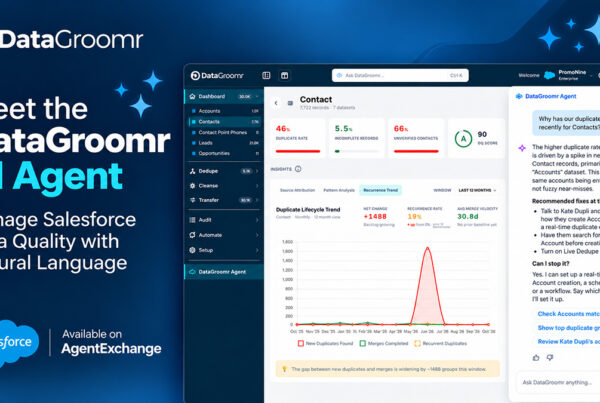
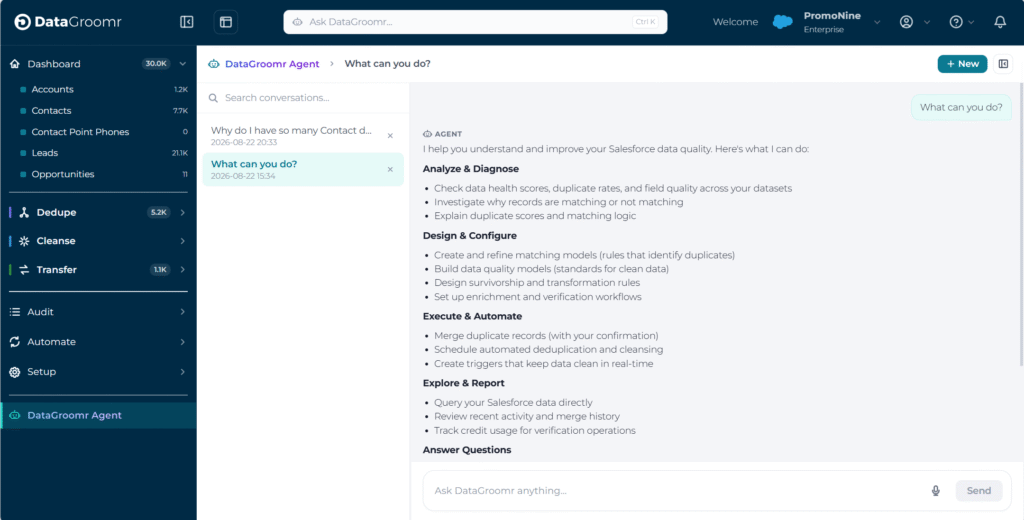
Meet Oscar, Your DataGroomr AI Agent
Say hello to DataGroomr’s new AI Agent. Our team calls him Oscar. Oscar gives you a conversational way to understand, improve, and manage your Salesforce data quality.
Ask Oscar to:
- Analyze and diagnose data quality issues
- Design and configure matching models, data quality models, and rules
- Take action to merge, cleanse, enrich, and verify data
- Automate and monitor ongoing data quality processes
- Answer questions and recommend next steps
Just type what you want to accomplish. Or you can even talk to it! Smart type-ahead in the top box will show relevant capabilities as you type, making it easy to explore available actions and formulate your request. A searchable chat history lets you continue a previous conversation.
Oscar is aware of where you are working. Ask a question from a Cleanse dataset, for example, and Oscar knows you’re talking about that dataset. That context carries throughout the conversation, making it easier to investigate an issue, understand what you’re seeing, and take the next step.
Why Oscar?
The code name isn’t random. Just around the time this project kicked off, my son Oscar was born, and honestly, everything has changed since he arrived — in the best way. He’s brought our entire team so much joy and excitement that when it came time to name the AI Agent, Oscar was the only name that felt right.
Why this matters: The gap between “DataGroomr can do this” and “I know how to make DataGroomr do this” is where a lot of value can be missed. Oscar brings DataGroomr’s capabilities to meet you in the context of your work, helping you move from question to action faster.
Validate Imports Before They Reach Salesforce
A required field left blank or an invalid picklist value can cause problems when imported data reaches Salesforce. The new Data Integrity Check helps you catch issues earlier, with a summary panel of staged imports which displays every validation problem in your file before you push anything to Salesforce.
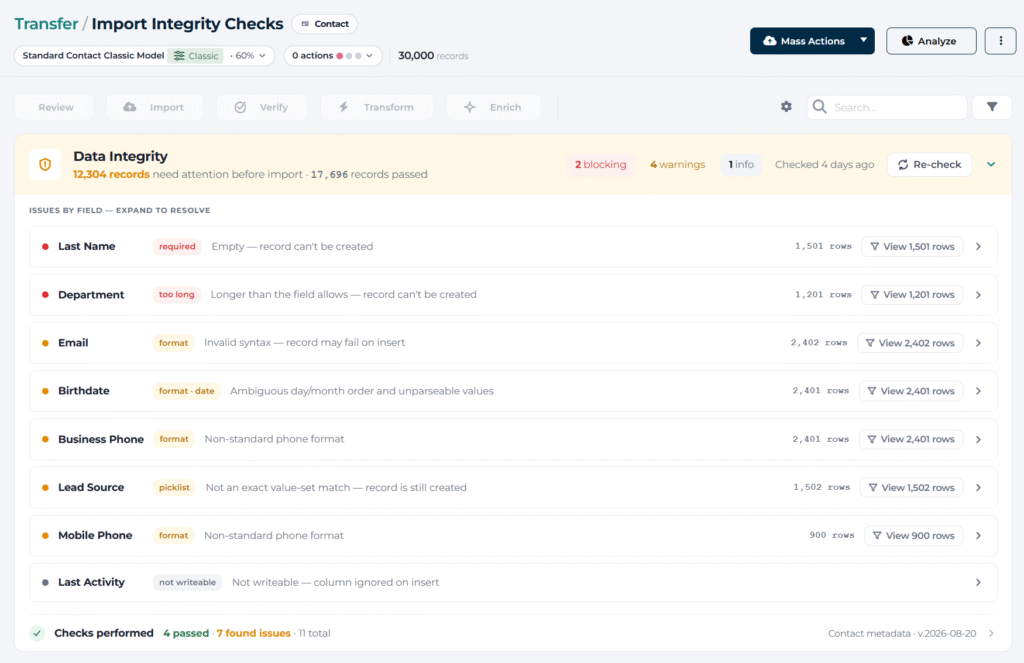
Issues are grouped by severity; so you can tell immediately whether a file is safe to push:
Blocking — The record can’t be inserted as-is.
Warning — The record will insert but with degraded or blank data.
Info — The record inserts fine; this is advisory only.
The check covers picklists, required fields, and formatting problems, and it’s designed to fit into how you already work: it sits at the top of the import dataset, stays collapsed once you’ve reviewed it so it doesn’t get in your way, and re-runs automatically as you correct issues so you can watch your file move from “attention needed” to “clear.” If a validation pass fails outright for some reason, you’ll see a clear error and a retry option instead of an empty panel.
Why this matters: Catching import issues before you push to Salesforce saves you from digging through Salesforce error logs, tracing the failure back to a source row, and re-running the whole thing. The Data Integrity Check empowers you to fix it once, in one place, and move on with confidence in your data.
A New Look: Dark and Semi-Dark Themes
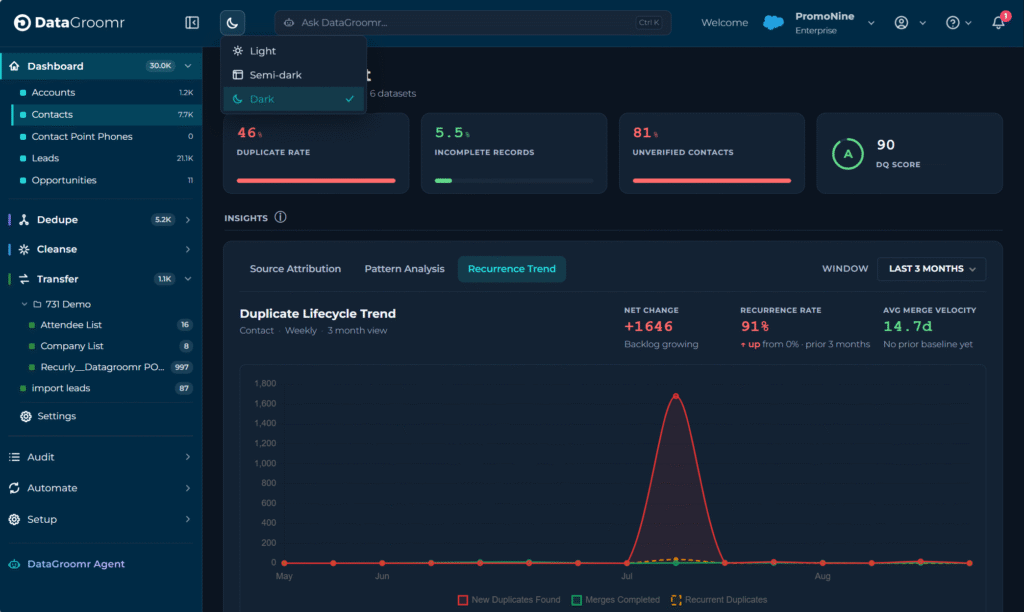
DataGroomr now offers dark and semi-dark themes, in addition to the light theme you’re used to — a frequent customer request. Switch themes directly from an icon in the navigation, and DataGroomr maintains your preference between sessions.
We also refreshed dataset headers, in both themes, across Dedupe, Cleanse, and Transfer. A new compact bar displays consolidated pills for matching models, DQ models, and configured actions. Each pill is a shortcut to the relevant settings tab to quickly get you to the tab you need instead.
Why this matters: Choose the viewing experience that’s most comfortable for you while getting a clean, scannable view.
Compare and Copy Configurations Between Orgs
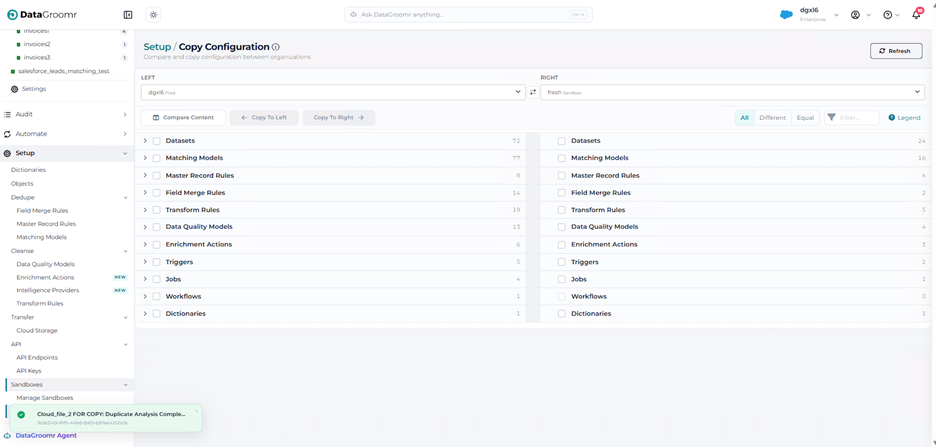
The new Copy Configurations page (under Setup) makes it easy to align configurations between sandbox and production. Compare datasets, matching models, rules, and DQ models side by side across your orgs and then copy exactly what you need from one org to another.
The comparison view groups results so you can filter to see what’s different or the same, or search by name, and it stays accurate even after you copy something over and refresh. When an item already exists on the target org, choose Overwrite or Keep Both, giving you control over what gets replaced versus what gets added.
Why this matters: Preventing configuration drift between sandbox and production is more reliable and saves you from manually re-entering configuration you already built.
Eight New Enrichment Providers
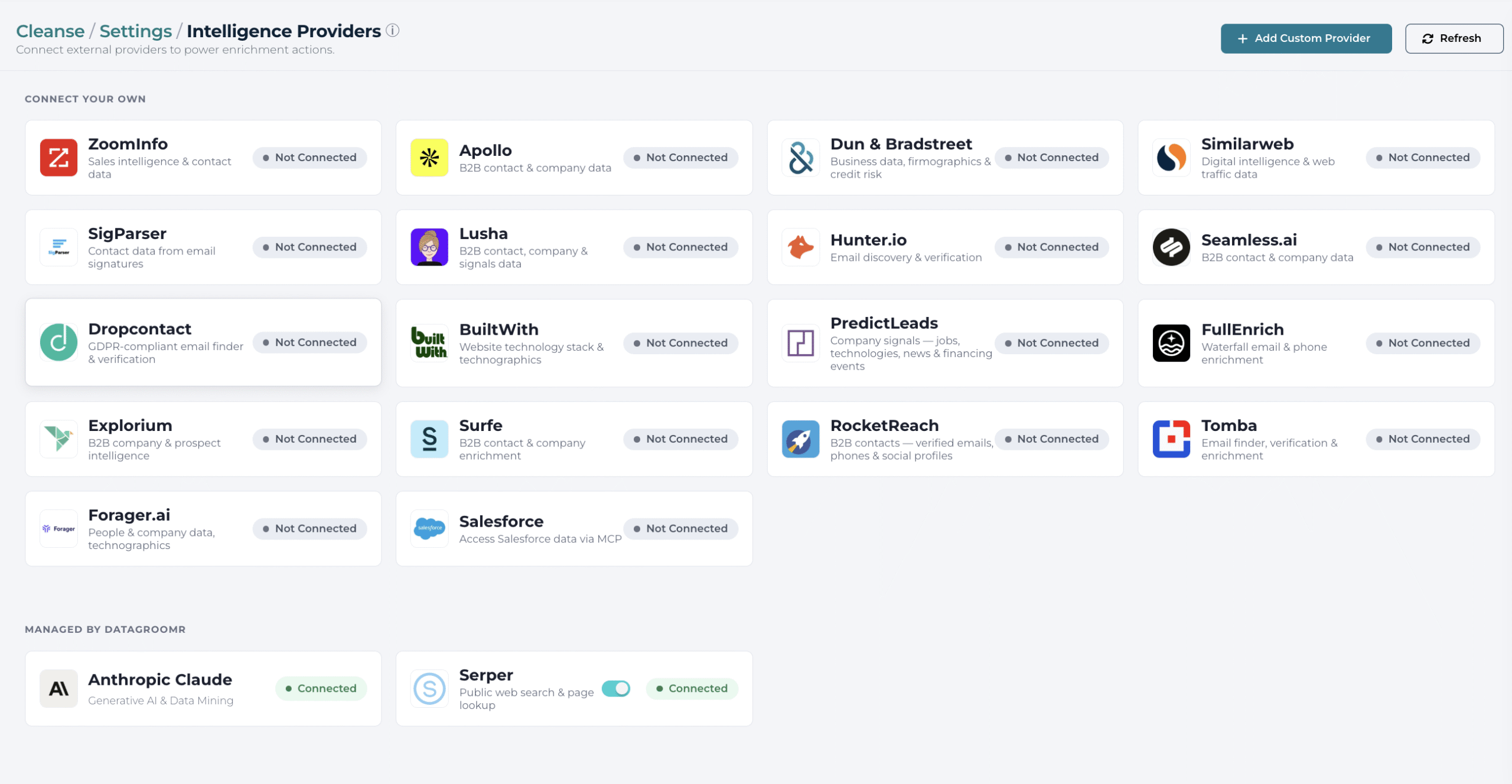
The DataGroomr data enrichment library keeps growing. This release adds eight new providers, each connected using your own credentials:
- LeadMagic — Contact and company enrichment
- Surfe — B2B people and company data, including email and mobile lookups
- PredictLeads — Technographics, hiring activity, news, and funding events to help identify account-level signals
- Explorium — Multi-source firmographic, technographic, and prospect data through a unified schema
- Tomba.io — Email discovery and verification, plus domain and company search
- RocketReach — Person and company search with verified contact details
- Forager — Verified mobile numbers and personal emails resolved from LinkedIn profiles
- FullEnrich — Waterfall enrichment that aggregates email addresses and phone numbers from 15+ underlying data providers in a single call, so you get the best available match without configuring each vendor separately
Each new provider plugs into the same enrichment workflow you already use. Simply connect it from the Providers screen to make it available to your enrichment actions.
Why this matters: More providers give you greater flexibility to choose the right source for each enrichment need. Or combine multiple sources within a single DataGroomr workflow for broader coverage and more complete data.
Other Improvements
Assign Transform Rules to datasets and fields — Apply a Transform Rule across multiple datasets and specific fields directly from the rules list with the new Assign button.
Transfer dataset validity filters — Filter Transfer datasets by verify field status, with the same filters surfaced in the relevant mass action dialogs so you can review exactly what a mass action will affect before you run it.
Simplified Salesforce MCP setup — The External Client App is now included with the DataGroomr Platform package, making it easier to enable Salesforce MCP communication.
Fixes Across the Platform
This release also includes a substantial set of fixes and reliability improvements. Custom-object merges provide more robust discovery and remapping of related records before deleting a duplicate. NPSP merge and rollback improve the handling and restoration of related records like Notes. Verification runs now continue past individual record failures. Background jobs and real-time triggers associated with deactivated Salesforce users are automatically disabled. Instead, admins are notified to avoid jobs from running using a departed employee’s credentials.
Matching models also received improvements including more relevant AI field suggestions and Opportunity AI matching models displayed on the Matching Models page. You’ll find additional fixes across Transfer mass actions and totals, Live Dedupe triggers, Verify subscription licensing, provider connection screens, and many display and usability details throughout DataGroomr.
Summary
This release makes DataGroomr smarter, more proactive, and even easier to work with. Oscar gives you a new, natural way to understand, configure, and act on your Salesforce data, making DataGroomr easier to navigate and operate. Data Integrity Checks catch bad data from imports before it reaches Salesforce. New dark and semi-dark themes and refreshed dataset headers create an easier day-to-day experience. Sandbox Transfers keeps your orgs in sync without manual rebuilding, and eight new enrichment providers give you more ways to fill the gaps in your data.
As always, everything is fully backward compatible. Your existing datasets, models, rules, jobs, and schedules continue to work exactly as they do today. The new capabilities are there whenever you’re ready for them.
Have an idea for what we should build next? Add it to our Ideas Portal or drop us a line at support@datagroomr.com. Features like Oscar’s page-context awareness and Sandbox Transfers in this release started as customer requests.
Happy DataGrooming!