The July ’26 release builds on prior major enhancements. While the previous release introduced enrichment orchestration as an AI-powered workflow, the July release focuses on the health of your Salesforce data, adds more enrichment data sources, enables real-time matching across related objects, and makes trigger execution predictable.
Below is an overview of what’s new and why it matters.
Your data quality, at a glance
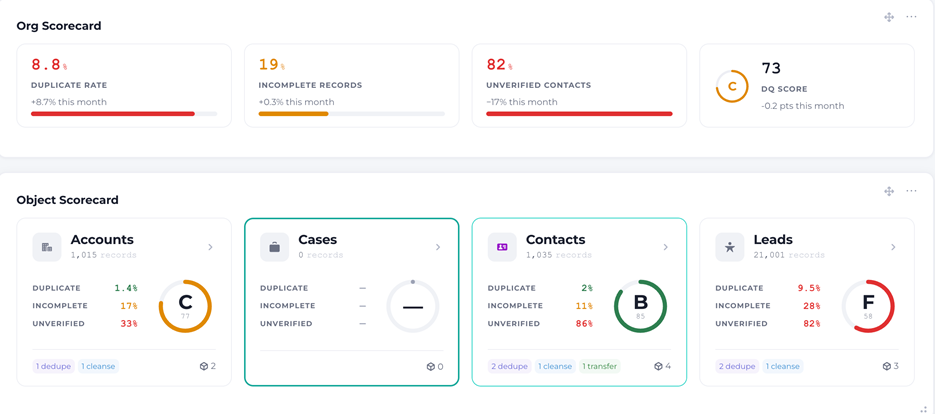
You shouldn’t have to open dataset after dataset to simply answer, “Is my data in good shape right now?“ This release makes it easy to view your data health in one centralized location.
A new global health KPI summarizes your most important metrics — Duplicate Rate, Incomplete Records, Unverified Contacts, and an overall DQ Score — in a single bar. Each metric is color-coded against severity thresholds and paired with a trend indicator to help you easily tell what’s healthy (in green), what needs watching (noted in amber), and what needs action (in red). While org-wide numbers are useful, the next question is always, “Which object is the problem?“ To help you identify this, every Salesforce object now has its own health scorecard depicting its key data-quality metrics, the modules active on it, and how many datasets it spans. You can line the object scorecards up to quickly spot the outlier and click straight into that object to address its specific data quality issues.
Since everyone monitors different metrics, the health views are configurable widgets you can add, arrange, and tailor. The Org Scorecard displays your org-wide KPI view; the Object Scorecard provides a per-object grid. Choose the metrics and objects you want to monitor, what each one displays, and build a dashboard that supports how your team works.
A tailored completeness score
A health score is only as accurate as the fields behind it. Until now, the completeness DQ model relied on a fixed, hardcoded field list, which meant the completeness number often needed hand-tuning to be relevant. Now, when you add a new object (or during initial org provisioning), DataGroomr uses AI to recommend the most relevant fields based on the object’s metadata and how its data is populated. The result is a more accurate and meaningful completeness score from the start and a trustworthy DQ Score on your dashboard.
Data quality often only improves when someone actually sees it declining. Placing Duplicate Rate, completeness, verification coverage, and an overall DQ score where everyone sees them clearly, every time they log in, shifts data quality from a periodic project into something you continually monitor, like other operational metrics.
Expanded data enrichment
Last month, we introduced clean data enrichment as an AI-powered workflow. This month, we’ve expanded this capability with more data provider integrations, more places to run it, more ways to schedule it, and more ways to bring your own context into a prompt.
We’ve added seven new third-party data providers to the enrichment library: Dun & Bradstreet (D&B) for authoritative firmographic and business intelligence, plus Hunter.io, Lusha, Similarweb, SigParser, Dropcontact, and Seamless.ai. Whether you need verified business emails, direct-dial phone numbers, firmographics, web-traffic intelligence, or GDPR-compliant European contact data, you can now add those attributes from your preferred data provider by connecting with your own credentials, or through a DataGroomr-managed connection where it’s available. You can configure each data provider the same way and access them from the same library, ready to drop into your prompts and datasets.
As we mentioned last month, we’re always building new integrations; so if there’s a specific data provider you’d like to use with DataGroomr, please let us know.
Enrich before you sync
This release expands access to data enrichment beyond Salesforce-backed datasets. Now you can also enrich records from the Transfer function including the local and CSV datasets you haven’t synced to Salesforce yet.
Picture a spreadsheet of leads from last week’s trade show. Before any of them touch Salesforce, you want to flag which ones fit your ICP and fill in the phone numbers that are missing. Simply drop the file into a Transfer dataset, open the new Enrich tab, and run Enrich on a single row or Mass Enrich across the whole list. Enriched values appear right in the grid — no sync required. Clean and qualify the list first, then bring only what you want into Salesforce. You’ve just saved yourself a lot of work and a lot of headaches that could have occurred.
Enrichment on a schedule
Mass Enrich can now run on a schedule to automatically enrich records on a recurring cadence alongside your other mass actions without manual triggering. Combine scheduled enrichment with the new providers and your prompt library to keep records continuously enriched. When the job completes, a report can be emailed (now available for Sync to Salesforce, Mass Enrich, Mass Import, and Mass Update jobs).
Connect to your Salesforce via MCP
If you enable your Salesforce connectivity via MCP protocol, you can now reference it directly inside enrichment prompts. This allows enrichment workflows to use data and business logic from your Salesforce instance, for example, assigning leads based on firmographics and territory rules, without leaving the enrichment workflow and integrating it into your data hygiene processes.
Choose your AI provider and model
When building enrichment prompts, you can now select both the AI provider and model used to execute them. Choose from AI providers including Anthropic, AWS Bedrock, OpenAI, and others. Then select the specific model version that best fits your requirements. DataGroomr’s Claude on Amazon Bedrock is set as the default, but you can switch providers or models at any time to balance capability, performance, and cost.
Cross-object real-time deduping and deeper matching models
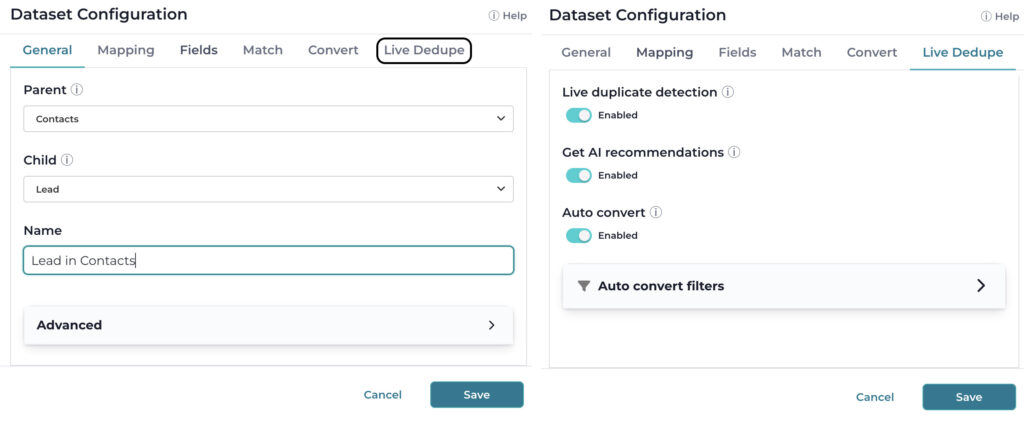
Duplicates rarely stay confined to a single Salesforce object. For example, Leads and Contacts often represent the same person at different stages of the customer life cycle. Live Dedupe now supports cross-object matching, allowing new and updated records to be evaluated in real time across related objects such as Leads and Contacts. If a record matches an existing record in another object, it can be identified immediately instead of waiting for a scheduled deduplication job.
We’ve also expanded how matching models, filters, and rules can access related data. You can now reference fields up to two relationships deep (for example,Contact → Account → Owner) when building matching logic. That makes it possible to create matching rules that reflect relationships across your Salesforce data model, not just the fields stored on a record.
Deterministic trigger execution
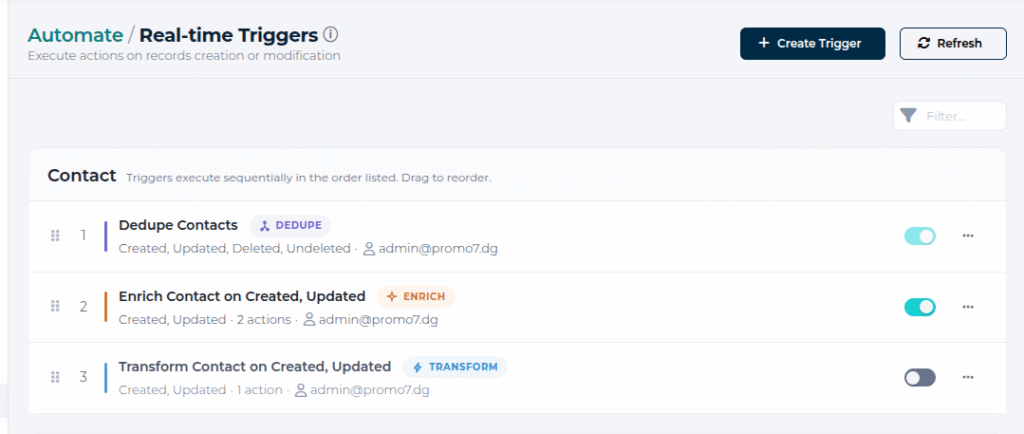
Real-time automation is only valuable when results are predictable. This release introduces a new sequential trigger execution engine that gives you greater control over how automations run.
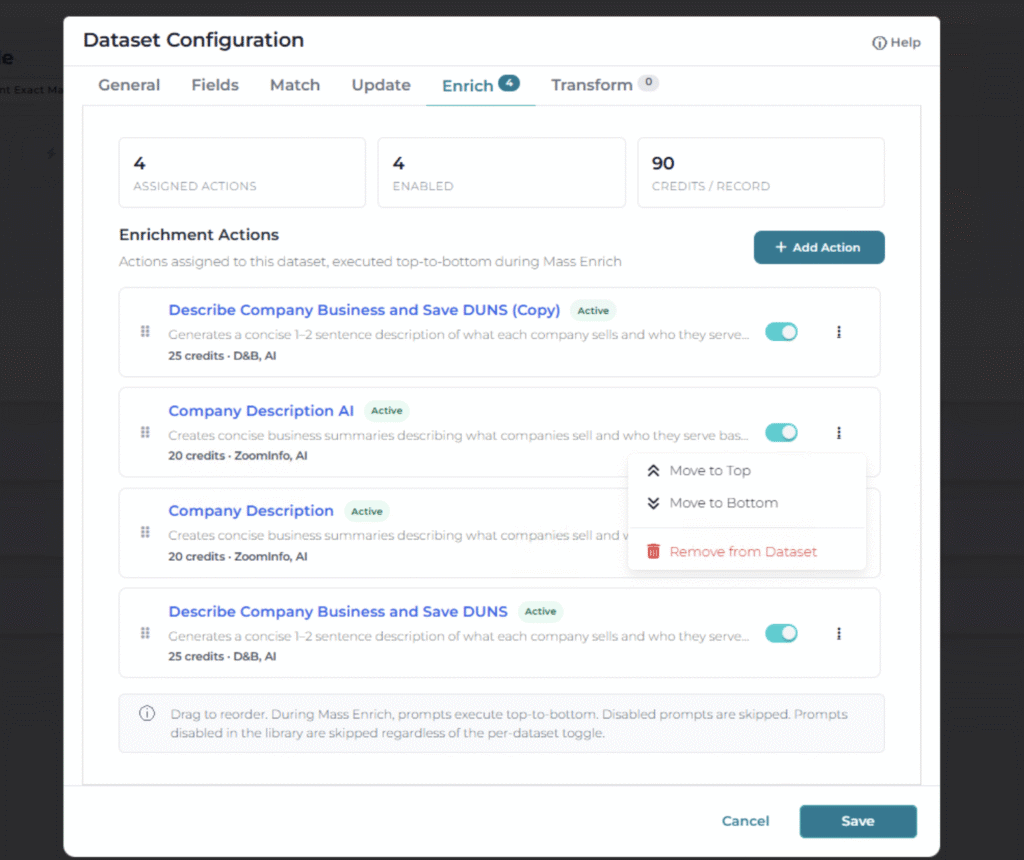
Triggers configured on the same Salesforce object now execute sequentially, in the order you define, rather than running in parallel. This eliminates many of the race conditions and inconsistent outcomes that can occur when multiple Live Dedupe datasets or triggers act on the same record simultaneously. Trigger execution is logged step-by-step in the Audit Log, providing visibility into what ran, when it ran, and how long it took. Disabled triggers and triggers that don’t match the event are skipped automatically, and if one trigger fails, the rest of the sequence still runs. Enrichment triggers now let you set the order in which prompts run, bringing the same sequencing control available in Cleanse datasets to enrichment workflows. When one prompt depends on a value written by another, you can ensure they execute in the correct order.
Other improvements
This release also includes improvements that make everyday work in DataGroomr a little smoother.
- Website verification now suggests redirects. When a verified website redirects to a new address, DataGroomr detects the change and suggests the updated URL, to help keep website data current.
- More control during lead conversion. A new option in the Advanced section of Lead Convert now lets you choose whether converting a lead should create a new opportunity.
- Lead conversion on Standard. Standard subscriptions can now convert leads into contacts and accounts, making a core workflow available without needing to upgrade to a higher-tier plan
- A refreshed Limits view. The subscription Limits display has a cleaner design, clearer color indicators for consumption limits, and a neutral “full” state for provisioning limits.
Built for everyone: WCAG 2.1 AA compliance
Accessibility is a core part of building software that works for everyone. With this release, DataGroomr now meets WCAG 2.1 AA standards, including improved keyboard navigation, focus management, and usability throughout the application. Whether someone works on a keyboard, screen reader, or mouse, the experience is more consistent and accessible. For organizations with accessibility requirements (such as government, education, and regulated industries), WCAG 2.1 AA compliance also helps simplify procurement and compliance reviews.
Bug fixes
We also squished over two dozen bugs. Many of these came straight from production telemetry and from customers who reported issues through the support portal. Thank you! Please keep them coming.
Looking ahead
Data quality is rarely a one-time project. It improves when issues are visible, workflows are automated, and the right information is available at the moment it’s needed.
This release is another step in that direction, bringing better visibility into data health, more flexibility in enrichment workflows, smarter matching capabilities, and greater control over automation. As always, every change is backward compatible, so you can adopt the new capabilities on your own timeline that works for your team.
If you’d like a walkthrough or want help adapting any of this to your workflows, our team is glad to help. And you can always submit feature requests through our Ideas Portal or reach out at support@datagroomr.com.
We look forward to hearing what works, what doesn’t, and what you’d like to see next.
Happy DataGrooming!