Salesforce renamed Data Cloud to Data 360 at Dreamforce in October, 2025 and made it the data layer under Agentforce. Here’s what it does to your customer data, what it leaves exactly as it was, and why Data Cloud and DataGroomr are two parts of a complete solution.
Key Takeaways
- Data 360 doesn’t clean your Salesforce data. It links it. Identity resolution reads your CRM records, decides which ones belong to the same person, and builds a unified profile from the links. Salesforce’s documentation says the result is a “system of reference,” not a golden record, and that it “doesn’t override any existing data.” The three copies of the same contact your rep opened this morning are still three copies after Data 360 runs. Reps, routing, reports and Agentforce still read the CRM.
- Dirty data now costs you twice. Duplicates always cost you in the CRM: storage tiers, split activity history, misrouted leads, double outreach, distorted pipeline. Data 360 adds a second meter. On consumption pricing, profile unification is the most expensive operation on the rate card, and every edit to a duplicate, every batch of new records, and every change to a match rule sends records back through it. On profile pricing, every duplicate that identity resolution fails to link is a billable profile at $240–$420 per thousand per year. Salesforce’s advice for controlling the bill is to prepare the data before it gets there.
- So are DataGroomr and Data 360 competitors? On the contrary. Data 360 and DataGroomr are complementary. Data 360 can’t fix a record in the system of record. That is not what it is for. DataGroomr does exactly that: it finds the duplicates, merges them in Salesforce, and standardizes the emails, phones and names that identity resolution matches on. Clean records flow into Data 360 through the standard connector, where they produce better unified profiles and a smaller bill. Informatica governs the enterprise; Data 360 governs the system of reference; DataGroomr keeps the system of record clean. Three layers, one data quality strategy.
Introduction
Many of our customers subscribe to Data 360. When they start their subscription, one of the first questions they ask is “Do I still need DataGroomr’s record hygiene when I have deduplication with Data360?” We love this question because the answer isn’t simply “Yes”. It is “Absolutely, yes, because if you don’t you may unnecessarily pay twice for processing a single record. And that can add up to thousands of dollars a month in wasted expense.” In this environment, having DataGroomr’s record deduplication and data cleaning capabilities isn’t a nice-to-have. It is a must-have in an end-to-end solution that optimizes your Data 360 investment.
The next few sections examine the relationship between Salesforce data hygiene and Data 360. The first section discusses the history of Data 360 within Salesforce. This is followed by an explanation of Data 360’s mechanics and how it handles records. The final section examines what happens when those mechanics are applied to “dirty” data with substantial duplicates.
Data 360: What It Is and Why Salesforce Built It
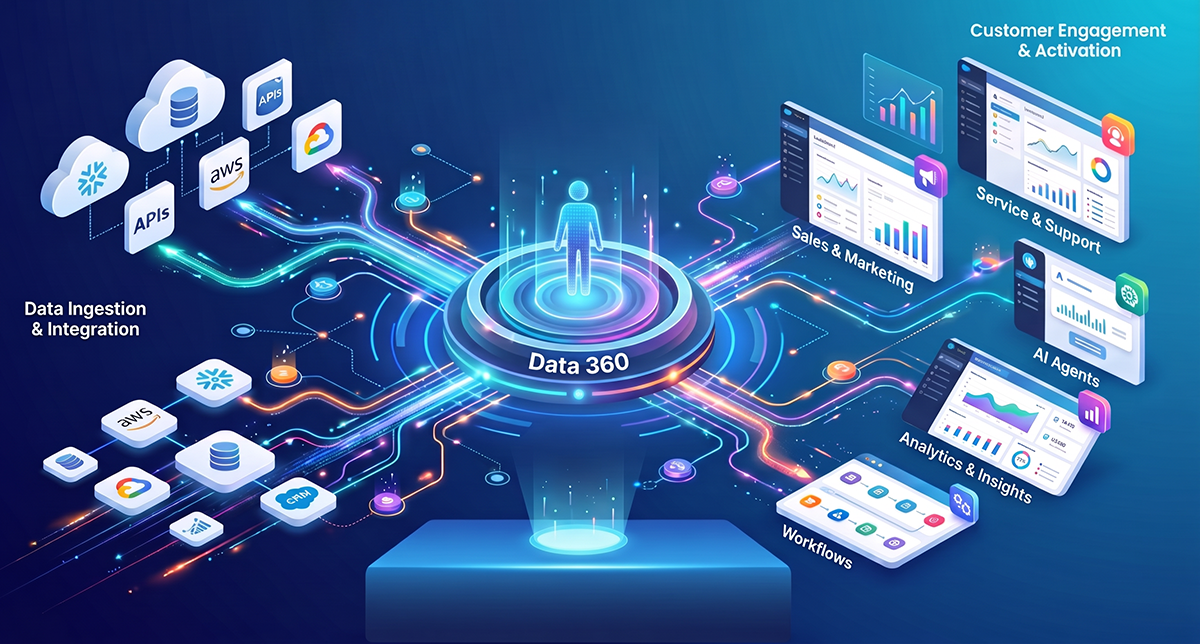
Data 360 is not a database of records. It is an identity graph – a database of links. An identity graph links disparate records to form a single user identity across many identifiers and channels. It also tracks changes and keeps a complete history by linking older records to their new replacements. My last article, “So Salesforce Bought Informatica: Your Salesforce Org is Still Full of Duplicates,” discussed how Salesforce, to maintain its preeminent position in the industry, has evolved to having data lake capabilities. Those capabilities allow its clients to link their customer data across disparate systems to achieve one view of the customer. Data 360 provides those links. It is not the system of record for any customer data. It links identities from the systems of record so that, for example, a customer’s interactions with retail store personnel, or credit card purchases that are handled by the finance division, are always tied to their email address you keep in Salesforce for doing email campaigns.
One of the most common scenarios identity graphs handle is when a spouse changes their name. Mary White may become Mary Smith, for example. She may change her name and email with the credit card division, but she doesn’t update her email address in her online profile. Data 360 tracks the change in her credit card name/email, stores the old value as a “historic link”, and then runs a graph update for her account. The central node on that graph of links is a single identifier – a number – that is the single best representation of that customer across multiple systems. It is an outward facing identity, made of an email from one source, a first and last name from another, and a phone number from a third. It does not look inward into your Salesforce CRM. All it adds to that database is the number of that central link. And there is no easy, or cost-effective way to get the data connected to that central link into the Salesforce CRM.
Salesforce charges for processing each link in Data 360. And if one link changes, then the system has to regenerate the entire graph for that customer. So if there are duplicate customer records in Data 360 and you are regularly updating the graph, then you are charged double (or triple or more depending on how many duplicates you have) each time you have to process a record change from any customer record across all your systems. Moreover, Data 360 has no built-in junk detection and no email or phone verification. Someone would have to manually find the junk records in Data 360, write the list of the strings to exclude, maintain it as reps invent new ones, and rerun the graph. That is a data-quality chore Salesforce leaves to the customer. Over time and at scale, the failure to have clean data, and a single “golden master” in Salesforce, can cost your organization thousands of dollars a year.
That is why DataGroomr is an essential part of an end-to-end solution for Data 360. DataGroomr helps organizations assess data quality, standardize inconsistent values, verify contact information, enrich incomplete records, and continuously prevent new duplicates from entering Salesforce. The result is more reliable source data for Data 360’s identity resolution process and the downstream applications that depend on it. Which is one reason that Salesforce awarded DataGroomr its Data 360 Partner Award at Dreamforce in 2026. Without a comprehensive data quality solution for your CRM, you risk generating thousands of dollars in wasted spend. In fact, Salesforce even says this is necessary. The Salesforce architecture blog from August 20261 talks about identity debt and says that step one is to normalize phones and emails at ingestion: “when you deploy artificial intelligence on top of fragmented identity data, you amplify existing data flaws” And the Salesforce consultant guidance is that new data should be “groomed to ensure accuracy and completeness before it’s even processed by your ruleset” in Data 360.2
History of Data 360
Data 360 has been evolving within the Salesforce product set over the last 10 years (Figure 1). It has had a complicated evolution with product transitions, mergers with other products Salesforce acquired or built, and multiple renamings. You can clearly see through the evolution that Salesforce was “trying to figure it out” and struggled to find the right product packaging and positioning.
Data 360 began life with the acquisition of Krux in 2016 for $700 million. Krux was a data management platform (DMP). DMPs store customer data and provide functionality that allows creating audiences, tracking, and serving ads to them across digital devices and channels. This became Salesforce DMP, and then later Audience Studio inside Marketing Cloud. This was the first time Salesforce owned a large-scale cross-source data engine.
Salesforce next announced Customer 360 Audiences in 2019. It was Salesforce’s first Customer Data Platform (CDP). A CDP is different from a DMP. A DMP has interfaces into the programmatic ad world. They bid on ad slots online and then deliver ads to ad networks and digital publishers targeted at the audiences contained in the DMP. But where do those audiences come from? They can come from the DMP – many DMPs have this built-in functionality. But the DMP focuses on online only – targeting audiences based on online responses to those ad campaigns. A CDP aggregates customer data across multiple channels (customer service, website, online, in-store, email, direct mail, etc.). It creates audiences based on that data. Those audiences will then be “hypotheses” sent to the DMP, tested there, and refined based on ad campaign performance. But the audiences from the CDP are also used for email targeting, TV and radio targeting, in-store promotions, and more. So it represents a much broader set of sources and use cases than a DMP.
Customer 360 Audiences built upon the foundation of Audience Studio, and was packaged with Customer 360 Data Manager and Identity under the Customer 360 Truth banner. Data Manager is where an identity graph and identity resolution first appeared on the Salesforce platform.
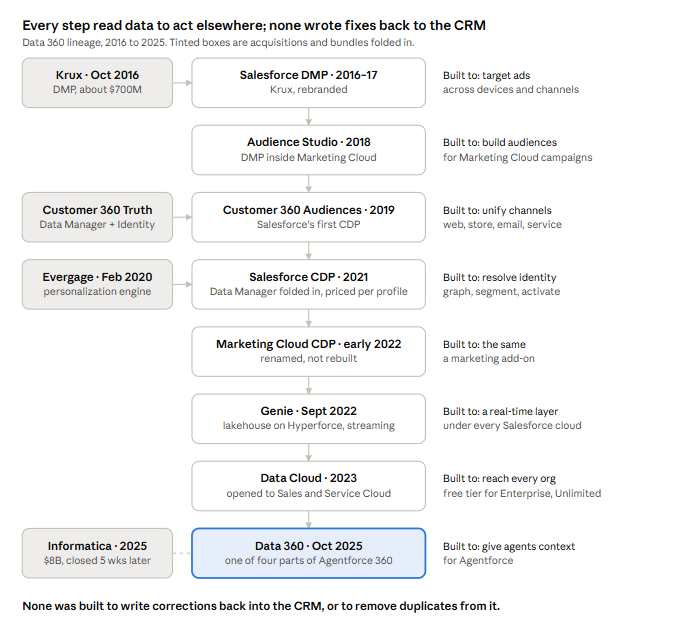
Figure 1 – The Ten-Year Evolution of Data 360
Salesforce purchased Evergage, a real-time personalization engine, in 2020. It was merged into the Customer 360 Data Manager as Interaction Studio, and later Marketing Cloud Personalization. Then in 2021, Customer 360 Data Manager and its related components were merged into Salesforce CDP. It provided data ingest, unifying identity via its identity graph, then audience segmentation and activation. It was sold mostly to Marketing Cloud customers and was priced per record/profile. This was the first instance of that pricing model for the CDP, and it has evolved into the current model for Data 360.
The evolution has continued into 2026. In 2022, Salesforce CDP became Marketing Cloud CDP and then Salesforce Genie. Genie was another huge architectural reset that now brought into play the first Salesforce-based data lakehouse. Based on Hyperforce, it had streaming data ingestion – a truly seismic shift for Salesforce. It became a real-time data layer under every cloud, not a marketing add-on. This was Salesforce’s first response to products like Snowflake and Databricks. Then last year, the product was renamed Data 360 at Dreamforce as one of four components of Agentforce 360. It became “the data layer that gives agents context.” One month later, the Informatica acquisition closed. Those last two were not unrelated events.
What emerges from this history is that every tentative step towards Data 360 increased Salesforce’s ability to read data and act on it somewhere else: ad targeting (Krux), personalization (Evergage), identity (Data Manager), segmentation (CDP), and agent context (Data 360). None was ever built to write corrections back into a source system. And none was ever built or added to the platform specifically to consolidate duplicate records in the core CRM.
As we discussed in “So Salesforce Bought Informatica: Your Salesforce Org is Still Full of Duplicates,” Salesforce was trying to maintain its relevance to an increasingly sophisticated customer base. It didn’t want to become a spoke to anyone’s hub, whether it was The Trade Desk (DMP), Treasure Data (CDP), Snowflake (third-party data lakehouse) or Apache Iceberg’s hub (build-it-yourself data lakehouse).
How Data 360 Works
We will use the specific example of a woman named Maria Gonzalez who is in our Salesforce CRM in order to better understand what DataGroomr does uniquely and what Data 360 does. In our example, there are three different records for a Maria Gonzalez (her correct name) or M. Gonzalez, none of which match or have the same contact information (Figure 2). But they look suspiciously similar.
Figure 2 shows how records are processed into an identity graph in Data 360. Data 360 performs a four step process (read top to bottom):
- Ingestion imports the data into the Data 360 lakehouse
- Mapping restructures the data into a standard model, called a Data Model Object (DMO) so it can be processed
- Resolving uses sophisticated machine learning algorithms to determine if two records represent the same person
- Outputting creates a set of links between records. Everything below Data 360 reads the summary. The dashed path is the only write back to the CRM, and it adds a field rather than fixing a record. If there are three Maria Gonzalez records in Salesforce before Data 360, you will still have three records in Salesforce after running Data 360, each with a single shared link ID.
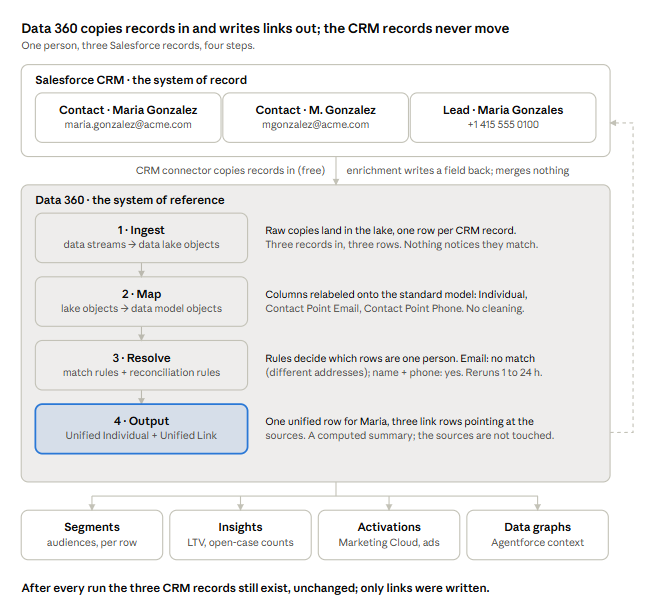
Figure 2 – How Data 360 Onboards Records, Processes and Outputs Links
There are 5 key concepts that underlay Data 360 that we need to understand before delving into the details of the four steps:
- Data Space is a secure, isolated partition that keeps brands, regions, or business units apart. It allows companies to subset their data for different divisions or purposes.
- Data Stream is a scheduled connection from one source into Data 360 (Figure 3). Salesforce CRM is one; a website’s activity data is another, for example. Streams run on a schedule (typically hourly to daily) as full or incremental loads.
- Connectors are the pipes that allow data streams to be fed into Data 360 from outside sources.
- Data Lake Object (DLO) is a raw table that mirrors the source data. A Contact in Salesforce becomes a Contact DLO in Data 360 with the exact same columns.
- Data Model Object (DMO). Data 360 ships a standard schema, the Customer 360 Data Model, made of data model objects (DMOs). A DMO is a converted record from the DLO into that standard schema.
We are now ready to do a deep dive into each of the steps.
Ingestion
Figure 3 details how ingestion works. A data stream is a scheduled connection from one data source into Data 360. Connectors are predefined interfaces that allow data sources to be brought into Data 360. There are CRM connectors for Salesforce objects: Marketing Cloud, Commerce Cloud, and Mulesoft. Real-time sources use the Ingestion API connector, .csv files stored in S3/GCS/Azure files use a file connector, and web or mobile sites used the Web SDK connector. There is also a unique connector into sources that are zero data enabled, such as Snowflake, Databricks and Redshift. Each of these connectors brings the data into Data 360 and stores it in a DLO. In our example, all three Maria (or M.) Gonzalez(s) are imported into the Salesforce DLO – Data 360 is blind to any subtle differences. It does not comprehend the meaning of any record at this point.
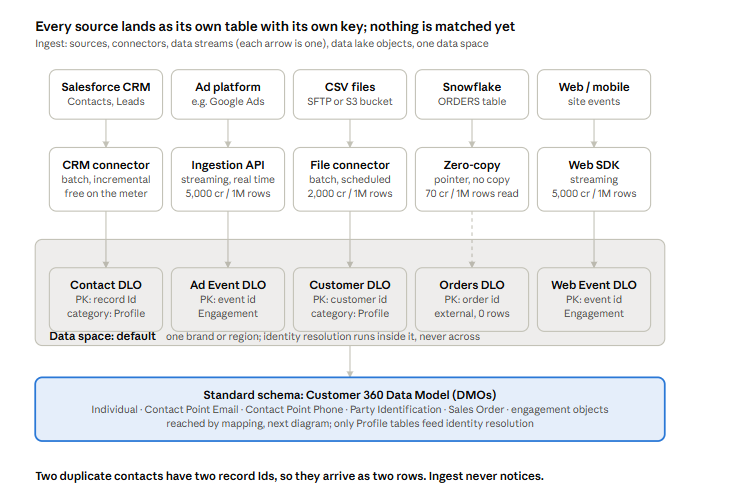
Figure 3 – How Data Is Onboarded into Data 360: Data Streams and Connectors
Let’s take a moment to explain how zero copy works, as it can be confusing to those unfamiliar with the technology. For most of the history of enterprise data, transferring data from one system into another meant copying it via an Extract/Transform/Load (ETL) layer: This is where PowerCenter from Informatica made its bones. Whether it is based on PowerCenter or a custom program, an ETL job reads the rows out of the source, moves them across the network, and writes them into the destination, where they sit as a second copy that is almost immediately stale and has to be refreshed on a schedule. Every integration adds another copy, another pipeline to maintain, and another place the numbers could disagree.
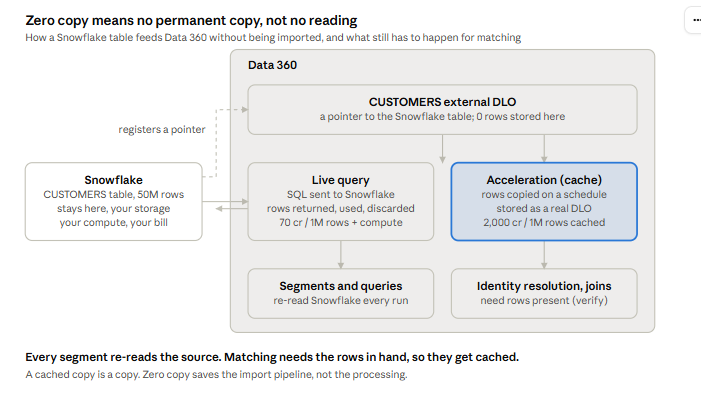
Figure 4 – How Zero Copy Works in Data 360
Zero copy (Figure 4) is the alternative that became practical once data lakes settled on open file formats. It is also somewhat of a misnomer, however. A copy does occur between systems, just in real-time and then, when read, the copy is deleted from the receiving system. Instead of moving the rows, the destination system is given a pointer to where they live and either sends its query to the source to run there (query federation: the source’s own engine does the work and returns just the answer) or reads the source’s files directly in place (file federation: possible when the files are in an open format such as Apache Iceberg or Parquet that any engine can read). Either way, nothing is imported and nothing is stored twice. The rows are read when a job needs them and forgotten when processing is done. What you save is the pipeline and the temporary second copy; what you still pay for is the reading, every time.
Data 360 calls this zero-copy data federation. It was launched as a partner program in April 2024 with Snowflake, Databricks, Google BigQuery and Amazon Redshift. It later added Microsoft Fabric and any lake that exposes Iceberg metadata. It works in both directions: a Snowflake table can be used inside Data 360 without being loaded, and Data 360’s own tables can be shared out to Snowflake the same way. On the inbound side, an admin sets up a zero-copy connector and a data stream exactly as for any other source, but the resulting data lake object is “external”. Data 360 holds no rows and acts as a pointer to the table in the warehouse.3 When a segment, query or calculated insight touches that object, Data 360 sends a SQL query to the warehouse, gets the rows back, uses them, and discards them.
Salesforce bills this at 70 credits per million rows read, and the warehouse bills its own compute on top. For tables that are large or change often, or for anything that needs the rows present in Data 360’s own storage, Salesforce offers “acceleration”. That means the stream is set to allow data to be cached in its system. Data 360 copies the rows in on a schedule and keeps them as a normal object, billed at 2,000 credits per million rows cached.4
This raises the question: isn’t what is in these tables the “golden master”? Why can’t I just use this record as the source of truth and align my CRM with that through the link in the customer record in my CRM? This is discussed in detail in a later section.
Mapping
Mapping takes data out of the DLO and puts it into the standard format that Data 360 can handle (Figure 5). It is the step where an admin identifies which DLO column feeds which DMO field:
- Contact.Email → Contact Point Email.EmailAddress
- Contact.Phone → Contact Point Phone
- Contact.FirstName → Individual.FirstName;
- Contact.Id → Individual.IndividualId.
Lead DLOs get mapped the same way, into the same DMOs With this conversion, Data 360 does understand what type of entity the data represents. It can now use that information to do entity resolution.
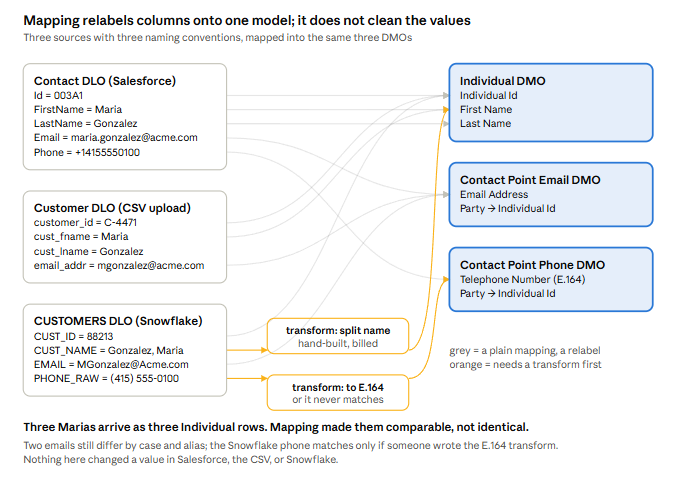
Figure 5 – How Data Lake Objects Map to Data Model Objects
Mapping does not clean anything. If the phone was (415)555-0100 in the CRM, that is the string in Contact Point Phone. Transforms exist for both batch and streaming. This is where a team would write a formula to strip punctuation or null out of m-gonzalez@none.com; it is hand-built per field, per source.
Resolving
Resolving is the secret sauce of any identity resolution engine. Salesforce’s version, as far as we can know it, is shown in Figure 6. Companies spend years perfecting the algorithms that determine if two records represent the same person and build a link between them. This process is dynamic. Maria Gonzalez may become Maria Anderson-Gonzalez in one year and then five years later become Maria Gonzalez again with a new email and physical address. Jim Anderson may become James Anderson-Gonzales and then Jim Anderson in that same timeframe with a new phone and mailing address. So you can’t just create and manage recent links. Historic links are just as important. The graph grows continually, has an ever changing set of nodes and edges, and never shrinks.
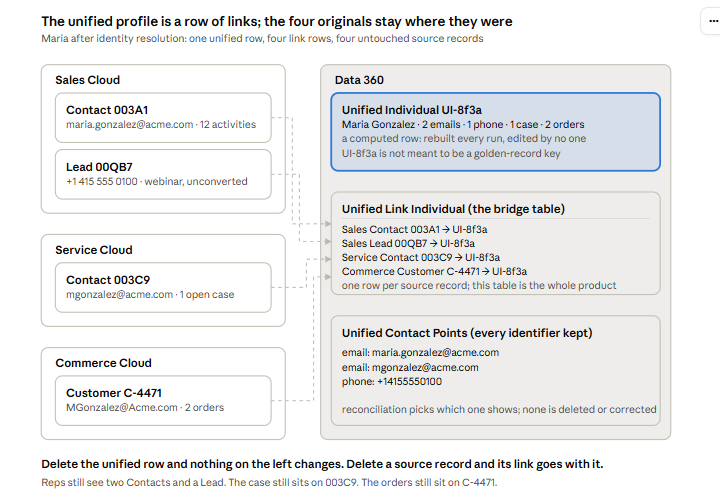
Figure 6 – How Data 360 Creates Its Identity Graph
In most cases the match is probabilistic. That is, it is assigned a likelihood that two records are the same. Many times, you can achieve a 95% likelihood. But it is more likely to get a probability much lower than that and the system has to decide where the cutoff is. And the cutoff can depend on which fields match and which don’t. An email address match is more certain than a physical address match. After all, John Smith at 123 Main Street and J. Smith at 123 Main Street may be the same person or they could be John Smith and Julie Smith. The system thus has to trade off between two failure modes which are basically the false positive and the false negative.
Failure Mode 1: The Split Profile (under-merging, or a false negative)
In this failure mode, one real person ends up as two or more unified profiles because the records didn’t pass the acceptable level of statistical confidence. It happens because of a typo in a phone number, two email addresses, “Maria” vs “Marie”, a phone stored as (415) 555-0100 in one system and +14155550100 in another, or a rule that requires too many fields to agree. In other words, we have a false negative
The consequences of a false negative are:
- Maria is two customers. She gets the campaign twice. If she unsubscribes on one profile, the other keeps emailing her.
- A customer service agent opens “Maria” and sees the case but not the order; so they ask her to explain her purchase again. This is what the phrase “too little consolidation leaves customers frustrated” means: the company doesn’t recognize her.
- Customer counts are inflated; so revenue per customer and acquisition cost per customer are understated.
- An Agentforce agent answers from half her history, with full confidence.
- Under profile pricing, two profiles for Maria are two billable profiles.
Failure Mode 2: The False Merge (over-merging, or a false positive)
In this failure mode, two or more different people get linked into one unified profile because a match rule achieved a high enough level of statistical confidence to make that claim. Examples of how it happens: a rule says “same phone = same person” and Maria and her colleague both have Acme’s main switchboard number. Or “same email” and both records carry info@acme.com. Or a database system filled blank names with a default and now hundreds of unrelated records match each other. Salesforce discards any profile built from more than 50,000 source records because, hard as it is to believe, this actually happens. And my guess is it will happen more with agents in the mix.
The consequences of a false positive are:
- Maria’s colleague gets offers based on Maria’s purchases. Segments include the wrong people.
- An agent, human or AI, sees the colleague’s case history on Maria’s profile and may repeat it to her. Consent is mixed: one person opted out, the merged profile says opted in.
- Customer counts in analytics are understated; lifetime value is inflated by attributing several people’s spend to one.
- Fixing it means changing a rule, which reprocesses everything and incurs unneeded costs.
Entity (Identity) resolution is always about tradeoffs like this and the rules are very complex. Overall, good rates for accurate results in third-party databases (where a person and their contact information are correct) is in the realm of 50%. No one publishes these numbers; they come from years of insider experience in the third-party data industry. What we can say is that Data 360 has no built-in junk detection and no email or phone verification. Someone would have to manually find the junk records in Data 360, write the list of the strings to exclude, and then maintain it as reps invent new ones, and rerun the graph. That is a data-quality chore Salesforce leaves to the customer. Again, this is why Salesforce’s own guidance is to have customer data “groomed to ensure accuracy and completeness before it’s even processed by your (Data 360) ruleset.”5
Outputting
After matching is done, Data 360 writes new DMOs, all prefixed Unified:
- Unified Individual (one row per resolved person, with the reconciled first name, last name, and so on)
- Unified Contact Point Email / Phone / Address (every identifier the person has anywhere),
- Unified Link Individual, the bridge table: one row per source record saying “source Individual X belongs to Unified Individual Y”.
That bridge table is the whole product. Maria’s two contacts and her lead each get a row pointing at the same Unified Individual. The three source rows still exist, unchanged, in their DLOs and in the CRM.
The unified row is a computed summary of them. The unified ID is regenerated each time resolution runs. Salesforce says not to use it as a golden-record key.6 When a match changes on the next run, the links move; nothing downstream is told.
Why Can’t The Unified ID Be Used in Salesforce
Earlier the article raised the question: isn’t what is in the cached tables via Data 360 the “golden master” and can’t we rationalize what is in Salesforce CRM using that information? The answer is that it can’t be, and the reason is operational, not due to content.
A master is the record other systems defer to and write back to. Three things stop the unified profile from being that:
- Its values are display choices, not corrected data. Reconciliation rules pick which email to show (most recent, most frequent, preferred source). The losing values aren’t marked wrong; they’re all kept. Nobody has decided which of Maria’s two emails is correct, only which one shows first.
- Its ID doesn’t hold still. Rulesets for how resolution is done change regularly. The unified ID is regenerated when the ruleset changes, and links move whenever a run re-evaluates them. Anything you reconcile into the CRM keyed on link UI-8f3a can be orphaned next week. This is why Salesforce’s own guidance is not to use it as a golden-record key.
- Nothing curates it. No steward confirmed Maria’s four records are one person. A rule did, at a precision setting labeled “medium,” with no published accuracy. Using an unreviewed match to make a destructive change in the system of record is the thing data governance exists to prevent.
The Identity Graph Creates a Substantive Double Billing Problem
Obviously, the fact that the links and any cached data in Data 360 are not set up to be used for standardizing records and reducing duplicates in your core CRM due to operational considerations is important. But there is an equally important factor to consider: MONEY. Data 360 is priced per record. Every time your customer graph is regenerated, you get charged for every link in the graph. Multiple links due to multiple records for the same customer cause you to be billed double (or more, if more than 2 records). And it can add up quickly.
Let’s take the example of Acme Corporation. Acme Corp. is a B2B company with 200 salespeople and 1,000,000 contact records in Sales Cloud. 15% are duplicates; so about 150,000 of those records are extra copies of people who are already in the system. All dollar figures below use Salesforce’s list prices as of October 2026 and are illustrative. Let’s examine where Acme’s costs come from (Figure 7).
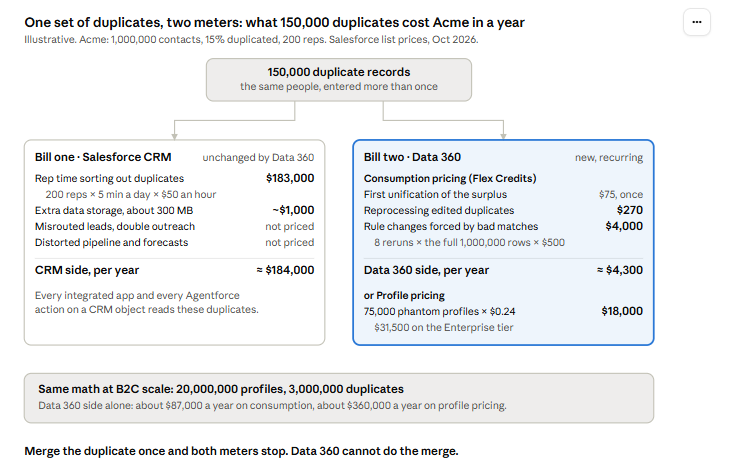
Figure 7 – The Cost of Duplicate Records in Data 360
Bill one: what the duplicates already cost in the CRM
Salesforce charges for storage. The extra data storage required for the 150,000 duplicate records costs about $1,000/year. But the real cost on this side- and the specific value DataGroomr brings – is the “hidden” costs of sales representatives’ time sorting out duplicates. Acme has 200 reps. If it costs them 5 minutes a day, over the cost of a year, the hidden cost to the organization is $183,000/year.7 That is the main cost of duplicates and why having a data cleaning solution in your CRM is essential.
But the impact on Data 360 isn’t insubstantial. There are two pricing models for Data 360 – Consumption (Flex Credits) and Per Profile pricing. WIth Consumption Pricing, you pay per row processed. Duplicates cost you when they’re first unified, when they’re edited, and when a rule change forces a full rerun. For Acme, that’s ≈ $4,300 a year. That’s four times the storage cost increase.
In Per Profile Pricing, unification is included in a flat fee; so none of those per-run charges apply. Instead, you pay per profile that exists after the run, and every duplicate that identity resolution failed to link is a profile you pay for. For Acme, that’s $18,000/year (or $31,500 on the Enterprise tier). That is 18x the cost of increased storage and 10% of your hidden costs. THAT is significant.
Conclusion
Hopefully, given this discussion, it is extremely clear why Data 360 and DataGroomr are complementary pieces of an end-to-end data quality and management solution. Together they ensure that the identity graph that Data 360 creates is accurate and minimizes costs to the organization.
- Data 360 is a database of links – an identity graph. Even in the case where data is stored in cache in the case of accelerated zero-copy, there data isn’t usable because the data is changing continuously and the rules for identity resolution change regularly, thus leaving a CRM record tied to an orphan, unmatchable link.
- Data 360 has no built-in junk detection and no email or phone verification. Even if you could find a way to write back into your CRM, you risk having bad data come in through Data 360. You’d still need to have a DataGroomr solution between Data 360 and your Salesforce CRM to ensure bad data from elsewhere doesn’t corrupt your core CRM database.
- Data 360’s ruleset picks which email to show (most recent, most frequent, preferred source). The losing values aren’t marked wrong; they’re all kept. Nobody has decided which of Maria’s two emails is correct, only which one shows first.
- Putting duplicates into Data 360 will cost you significant wasted spend because of Data 360’s per-record and per-update pricing model.
1 Chalamon, Patrice. “4 Steps to Eliminate Identity Debt and Build Reliable Agentic AI with Data 360.” Salesforce Architecture Blog, August 6, 2026. https://www.salesforce.com/blog/eliminate-identity-debt-data-360/
2 Wagner Tidwell, Erin. “Balance Precision and Consolidation with Better Identity Resolution Match Rules.” Salesforce Blogger (independent blog), June 11, 2025. https://www.salesforceblogger.com/2025/06/11/balance-precision-and-consolidation-with-better-identity-resolution-match-rules/
4 https://www.salesforce.com/blog/4-lessons-implementing-zero-copy-data360/
5 Erin Wagner Tidwell, Balance Precision and Consolidation with Better Identity Resolution Match Rules, salesforceblogger.com, June 11, 2025
6 Salesforce’s own Trailhead module, “Understand Unified Profiles and Their Impacts on Data Strategy”, says verbatim: “The unified ID assigned to an individual can change,” and contrasts it with a golden record, where “The unique identifier assigned to an individual is permanent.”
7 200 reps × 5 min × 220 days = 220,000 min ÷ 60 = 3,667 hours × $50 = $183,333