2026 Update
This article was originally published in 2020 and continues to be relevant because the fundamentals of Salesforce data cleansing haven’t changed. Since then, Salesforce orgs have grown larger, integrations have multiplied, and automation has increased. The best practices below still apply, but the scale and urgency of data quality have increased.
Salesforce is a powerful tool that can help your business grow, but it can only reach its full potential when it’s populated with good quality data. As a content management expert, it’s not uncommon for people to tell me that their Salesforce data isn’t quite where they want it to be. If you’re in the same boat, this article is for you. I’ll share information on Salesforce data cleansing best practices that you can adopt to prevent data quality issues occurring and how you can go about fixing the existing quality-related issues that have found their way to your CRM before prevention measures were in place.
The Cost of Bad Quality Data
Business leaders underestimate the true cost of bad data for their business. According to Gartner’s Data Quality Market Survey, bad data is really hitting businesses where it hurts, their pockets – to the tune of $15 million on average per year. “Hidden” costs include sales reps chasing the same lead, marketing campaigns built on inaccurate or incomplete information, and reporting that can’t be trusted. And setting aside the financial ramifications, the reality is that bad data kills data-driven initiatives. While you may have a substantial amount of data in Salesforce, your data may lack the quality standards required to achieve actionable insights.
Types of Bad Quality Salesforce Data
You’ve heard about bad quality Salesforce data, but what is it and why is it bad for your business?
| Type | Why it’s Bad |
| Duplicate Records (Multiple lead, contact or account records for the same contact) | Your sales team will not have a centralized view of the prospect, allowing them to carry out any due diligence prior to reaching out. May also result in duplicate outreach, annoying prospects. |
| Consistency ( Records lack the use of capitalization in the First Name field) | For marketing, lack of proper consistency in records, specifically first name, can hamper adding any personalization to email campaigns. Apart from that, sending personalized emails where names are not formatted properly just looks bad. |
| Completeness (Missing key fields like industry, country, company size or lead source)
|
Missing information prevents marketing teams from segmenting contacts for email campaigns. When your org is hosting an event in a particular territory, let’s say Japan, for example, where do you think they pull the data from? That’s right, Salesforce. Can also distort lead scoring. |
| Junk Records (Fake names, spam email addresses) | Junk records are unnecessary clutter in your org that find their way to your marketing automation system and skew open rates for email campaigns. Oh, and they take up precious storage space in your org. |
How to Find, Fix, and Prevent Bad Salesforce Data
1. Assess the Situation
Before you clean anything, understand what you’re dealing with. Run a data quality audit focusing on:
- Duplicate rates by object (Accounts, Contacts, Leads)
- Field completion percentages for critical fields
- Data decay indicators (bounce rates, invalid phones)
- Records touched in the last 90 days vs. dormant records
Create a priority matrix. Which records matter most? Active opportunities trump cold leads. Named accounts beat random contacts. Focus your energy where it drives revenue.
2. Identify the Source
There are many effective cleansing techniques that you can use to declutter and organize your data to achieve a closed reporting loop for your organization. However, before you can fix the problem, you need to understand how it occurred in the first place so that you can take steps to prevent it from happening again. In my experience, typical causes tend to be poor manual data entry, botched imports, third-party integrations, and marketing forms without validation.
How to Identify the Sources
To sidestep identifying the sources manually, consider using reports to isolate bad data. Not only will it provide you with immediate intel on the causes, it can be used to keep tabs on the health of your records. Take a look at the examples below for inspiration on the types of reports you might want to create.
- Consistency: Look at the variations used in fields such as date, state and country.
- Completeness: Look at records that are missing values in key fields.
- Junk records: Look for suspicious values in fields such as first name, last name, and email address. Check bogus values like adhshdhs@djshdjs.com.
3. Act: How to Fix Salesforce Data Quality Issues and Prevent Reoccurrence
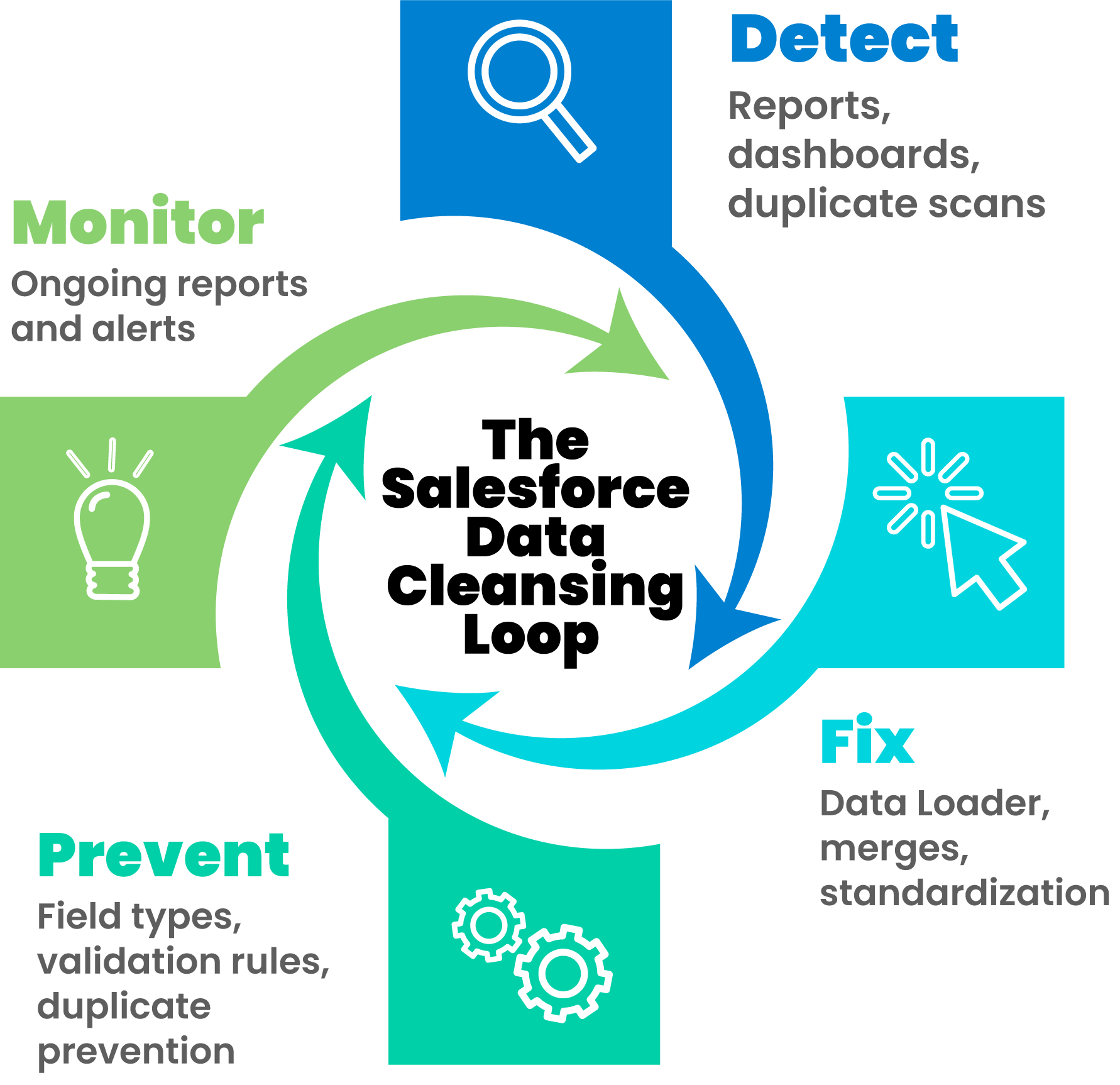
Armed with the intel on the types of bad data your organization is up against, now you’ll want to look at ways of fixing the records affected by these issues and put measures in place to prevent restarting the cycle.
Prevent Future Missing Field Values and Inconsistent Field Values
It’s at this stage that you should assess the field types that your organization uses. By type, I mean: number, formula, date, etc. Believe it or not, I still see some companies that have used text fields to house dates. Can any of your field types be changed to limit the control users have over the data that can be entered into the field? A practical example would be to utilize picklists for fields that will only ever be populated with a value from a specific set of options.
Going further, you may want to make the fields that house essential information, required fields. In doing so, users will not be able to save records until they have populated all of the required fields. It’s worthwhile noting that while this is an effective solution, it’s only useful for fields that should always have a value, ‘company’ for example. In cases where populating a field is only required when another field contains a certain value, you’ll want to look at implementing validation rules. Validation rules allow you to define standards for your records based on logic.
How to fix the historical missing and inconsistent field values
If you don’t use Salesforce’s Dataloader, now would be a good time to start. It’s one of the free tools that I use regularly to populate missing field data and append field values to address inconsistent data.
One thing to note about the Dataloader, is that it’s not what you’d class as a ‘quick fix’, as you need to append the record data in a CSV file prior to using the tool to mass update field values. That said, while it’s time consuming, it’s definitely the fastest way to mass populate and append Salesforce record values.
Find and Merge Duplicate Salesforce Records
Salesforce comes with some in-built duplicate management features that you can leverage to detect duplicates.
Potential Duplicates Component (Lightning Experience): Add this component to page layouts so that users can see potential duplicates at record level and merge.
Merge Contacts Button (Classic Experience): Unlike the potential duplicate component in Lightning Experience, this button comes out of the box and allows users to find and merge duplicate records that are attached to the account.
Keep in mind that while finding duplicates is relatively easy, deciding how to handle them can be harder. The merge process is key, since it determines which record survives and what data to keep.
Matching Rules and Duplicate Jobs: Set up rules to define what your organization would class as a duplicate record then run a duplicate job to assess your data versus the criteria outlined in the matching rules. Learn more about Salesforce Duplicate Rules and Matching Rules.
Examine Integration Settings
Many duplicates can enter your CRM via various integrated apps and cross-functional workflows. Your marketing automation platform syncs new leads into your CRM automatically. Your sales engagement tool creates contacts. Your data enrichment service updates records. Each system has its own ideas about matching logic, and none of them talk to each other. The result? Records that look different enough to bypass deduplication but represent the same people. Take a close look at these and consider tightening matching criteria to prevent imports and enhancements from other applications from adding duplicate or incorrect information.
Systematize and Sustain
Cleanup without maintenance is just postponed chaos. Build these healthy habits into your operations:
- Schedule weekly deduplication scans: Catch problems before they compound.
- Create a data quality dashboard tracking key metrics over time.
- Assign data stewardship responsibilities: Someone needs to own this.
- Document your standards so new team members know the rules.
Set up automated workflows that maintain quality without constant manual intervention. DataGroomr can merge duplicates automatically based on your rules, so your team focuses on selling instead of data entry.
Conclusion
All in all, Salesforce provides some pretty robust features to manage data quality. However, if your organization is a bit late to the data quality party, it’s extremely likely that you’ve got a bad data and/or duplicate epidemic already in play. Especially if your org has a large or fast-growing dataset, years of historical duplicates, and/or limited admin resources, native tools can feel painfully slow. In such cases, specifically for duplicate record pandemics, I’d encourage you to take a look at the third-party Salesforce Data Cleansing options to help speed up the initial clean-up exercise. Take it from me, merging duplicates records natively in Salesforce is a drag (sorry, Salesforce!)
What’s Changed Since 2020
While the core principles of Salesforce data cleansing remain the same, a few realities have shifted since this article was originally written.
First, Salesforce data volumes are significantly larger. Orgs that once managed tens of thousands of records are now dealing with hundreds of thousands—or millions. At that scale, small data quality issues compound quickly.
Second, integrations are more common. Marketing automation platforms, enrichment tools, event systems, and product data now feed Salesforce continuously. Each integration is a potential source of duplication or inconsistency if not governed properly.
Finally, automation has raised the stakes. When workflows, routing rules, and AI-driven tools rely on bad data, problems move faster and spread further. Clean data is no longer just about reporting—it’s about preventing downstream failures.
Frequently Asked Questions About Salesforce Data Cleansing
How often should Salesforce data be cleansed?
At minimum, data quality checks should run quarterly. High-growth orgs or import-heavy teams may need monthly reviews.
Is Salesforce’s native duplicate management enough?
For small orgs, sometimes. For larger or older orgs, it’s usually not enough on its own—especially for historical cleanup.
What’s the biggest cause of bad Salesforce data?
Manual data entry combined with weak validation. If users can enter inconsistent data, eventually they will.
Should required fields be used everywhere?
No. Overusing required fields frustrates users and encourages workarounds. Use them selectively and pair them with validation rules.