The May’26 release is one of the most substantial updates to DataGroomr in a long time. It expands the platform from a deduplication and cleansing tool into a full AI-powered data quality and enrichment workspace – bringing AI-driven enrichment with prebuilt templates, native integrations with ZoomInfo and Apollo, real-time enrichment triggers, and a reimagined Match Confidence experience that finally answers the question every data steward has been asking for years: “Why exactly were these two records considered a match?”
Beyond the headline features, this release also delivers a refreshed user interface, a more reliable Live Dedupe engine, and dozens of improvements that make everyday data work lighter. Below is a tour of what’s new and why it matters.
A complete enrichment workspace, powered by AI
Enrichment in DataGroomr is no longer a single feature. It’s a workflow – and in this release, that workflow becomes first-class, with AI at its foundation. Every enrichment call goes through DataGroomr’s AI engine, which orchestrates the right data source, applies your prompt logic, and writes results back to Salesforce in a consistent, governed way.
That foundation supports multiple providers for enrichment; all configured the same way and all available from the same library:
- AI-based enrichment – natural-language prompts that use a large language model to infer or generate values from existing record context (think “classify this lead’s seniority based on their title,” or “write a personalized outreach line for this account”). This is where DataGroomr’s AI engine does the heaviest lifting.
- ZoomInfo – native integration with ZoomInfo’s firmographic and contact data, brought into your enrichment pipelines.
- Apollo – native integration with Apollo as an enrichment provider.
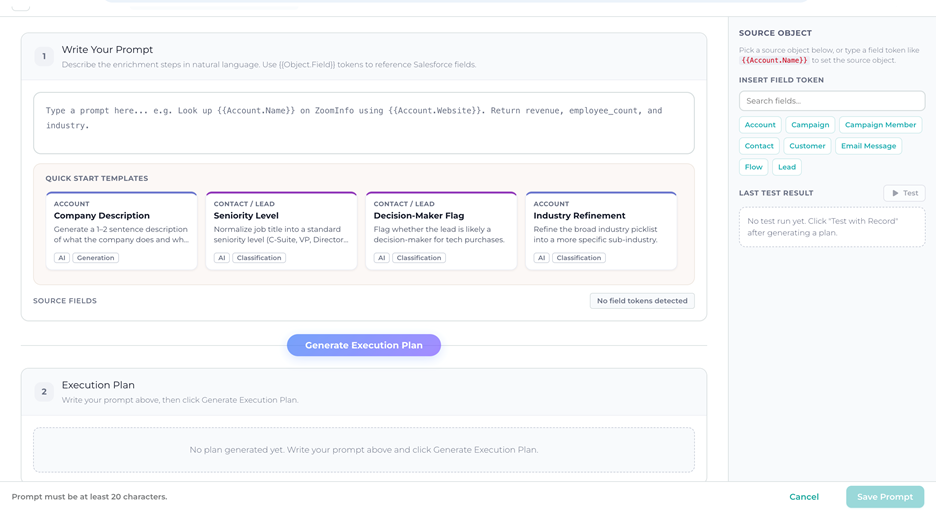
You can mix and match providers within a single dataset, and the AI engine can chain them together – for example, pulling firmographic baselines from ZoomInfo, then layering an AI-generated ICP Fit Score on top of those values. We’ve given enrichment its own templates library, its own dataset-level configuration tab, native integrations with both major data providers, and the ability to run automatically as records are created or updated. Together, these pieces turn enrichment from “a thing you can do” into something you can plan, govern, and scale across an entire Salesforce org.
We’re actively building and exploring additional data integrations. So, if there’s a data provider you’d like us to consider, please let us know!
Here’s how it comes together.
Quick Start Templates: enrichment without the blank page
Setting up enrichment used to start with a blank prompt and a long discovery conversation: What do we want to know about this account? How should we describe it to the AI? What field should we write back to? That works once. It doesn’t scale.
The new Quick Start Templates library ships with a curated set of ready-to-use enrichment prompts covering the most common B2B use cases. Every template is fully editable; – you can use it as-is, or adapt the prompt text and field mapping to match your ICP, your segmentation model, and your industry vocabulary.
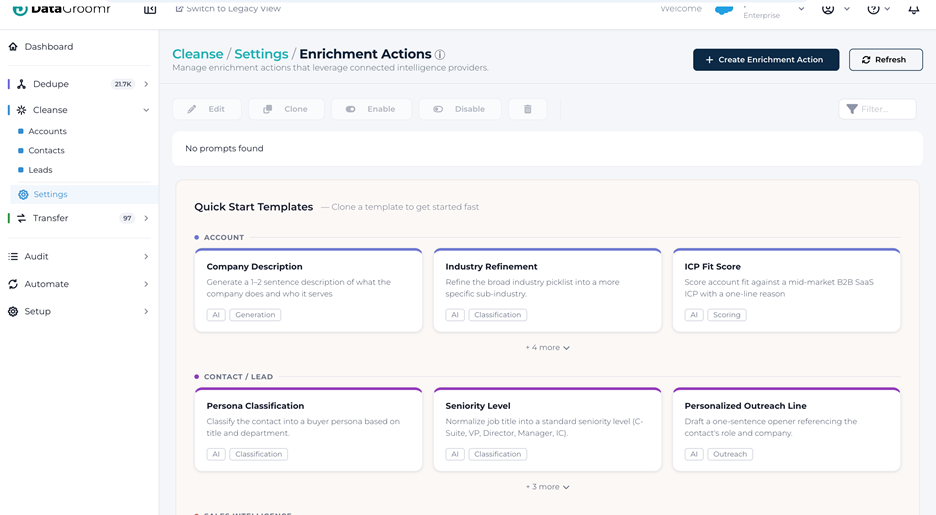
The library is organized into four categories:
- Account enrichment – Company Description, Industry Refinement, Employee Size Band, ICP Fit Score, Tech Stack Detection, Parent Company Identification. These cover the firmographic and account-strategy basics that most CRMs are missing on the majority of records. Account.Description alone is blank on most accounts that come into Salesforce, and reps need that context before every call.
- Contact & Lead enrichment – Seniority Level, Department Classification, Buyer Persona, Decision-Maker Flag, Sales Region, Market Segment. These are the foundational classifications every lead-scoring and routing model assumes you have, and that almost always need to be inferred from raw fields like Title and Country.
- Sales intelligence – Personalized Outreach Angle, Inferred Pain Point, Competitive Landscape, Lead Source Channel. This is the higher-value, AI-native enrichment that gives reps something genuinely useful before they pick up the phone.
- Opportunity enrichment – Deal Risk Assessment, Next Step Suggestion. Pipeline hygiene at scale, with AI-generated risk flags and stage-appropriate next steps embedded directly into the opportunity record.
The point isn’t that you have to use these templates exactly as written. The point is that you no longer have to invent enrichment from scratch. Most teams will start by enabling three or four templates, watch the results, then tune the prompts to fit their voice and criteria. That first hour goes from a planning meeting to a working pipeline.
Dataset-level Enrich settings
Once you have a library of enrichment prompts, the next question is: which prompts run on which dataset?
A new Enrich tab on the Cleanse dataset configuration answers that. The tab sits between Verify and Transform, and it’s where you assign enrichment prompts from the global library to a specific dataset and control how they behave on that dataset.
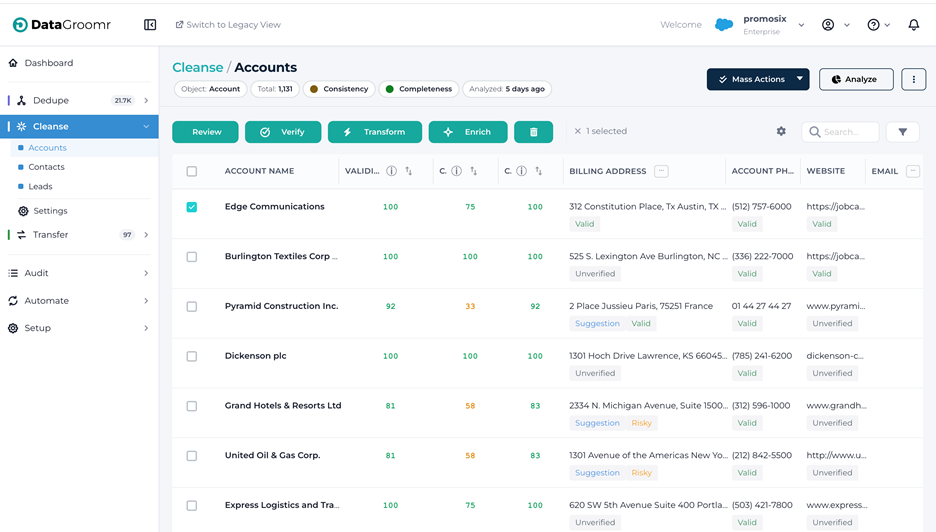
What you can do from the Enrich tab:
- Assign prompts from the Prompts Library via a picker that filters
toprompts compatible with the dataset’s Salesforce object type. Prompts already assigned are shown grayed out so you don’t accidentally double-up. - Drag-and-drop to control execution order. Prompts run sequentially top-to-bottom during Mass Enrich, which matters when one prompt depends on a field written by another. (Classic example: Enrich Company Firmographics writes AnnualRevenue and NumberOfEmployees; ICP Segment Classification reads them. Order matters.)
- Enable or disable individual prompts per dataset without affecting other datasets that use the same prompt. The same “Enrich Company Firmographics” prompt can be active on “US Accounts,” paused on “EMEA Accounts” while you tune mappings for European data, and turned off entirely on a junk-data sandbox dataset – all from one place.
- See cost and impact at a glance – credit cost per record, number of fields written, and whether the same prompt is also running on other datasets.
This is the layer that makes enrichment governable at scale. Instead of duplicating prompts for every dataset variant, you author once and assign many – and you keep visibility into where every prompt is running.
Native ZoomInfo and Apollo integrations
For teams that already pay for an external data source, DataGroomr now integrates natively with both ZoomInfo and Apollo via OAuth. You connect your own account once, authorize the integration, and the provider becomes available alongside AI-based enrichment in the same prompt library and the same dataset Enrich tab. Credit usage and API rate limits stay under your own provider account. There’s no shared pool, no surprise billing, no proxy in the middle.
Why this matters: a lot of revenue teams already pay for ZoomInfo or Apollo as their primary data source. Until now, getting that data into Salesforce meant exports, manual imports, or fragile middleware. With native integration, third-party data flows straight into your enrichment pipelines on the same datasets you’re already deduplicating and verifying. This means one workflow, one place to govern, and one audit trail.
And because everything runs through the same AI foundation, you can compose pipelines that combine providers: pull firmographics from ZoomInfo, augment contacts from Apollo, and finish with an AI-generated next-best action – all on the same record, in the order you choose, with full visibility into what each step costs and writes.
Real-time enrichment triggers
The final piece of the enrichment story is timing. Enrichment is often most valuable the moment a record is created – when reps need context, routing rules need segment information, and lead-scoring engines need seniority and department.
This release adds real-time enrichment triggers that fire whenever records are created or updated, mirroring how real-time verification has worked for years. Combined with the new Dedupe trigger action (more on that below), the Triggers page now supports the full lifecycle: records are verified, deduplicated, and enriched automatically, the moment they enter Salesforce, before they ever hit a rep’s queue.
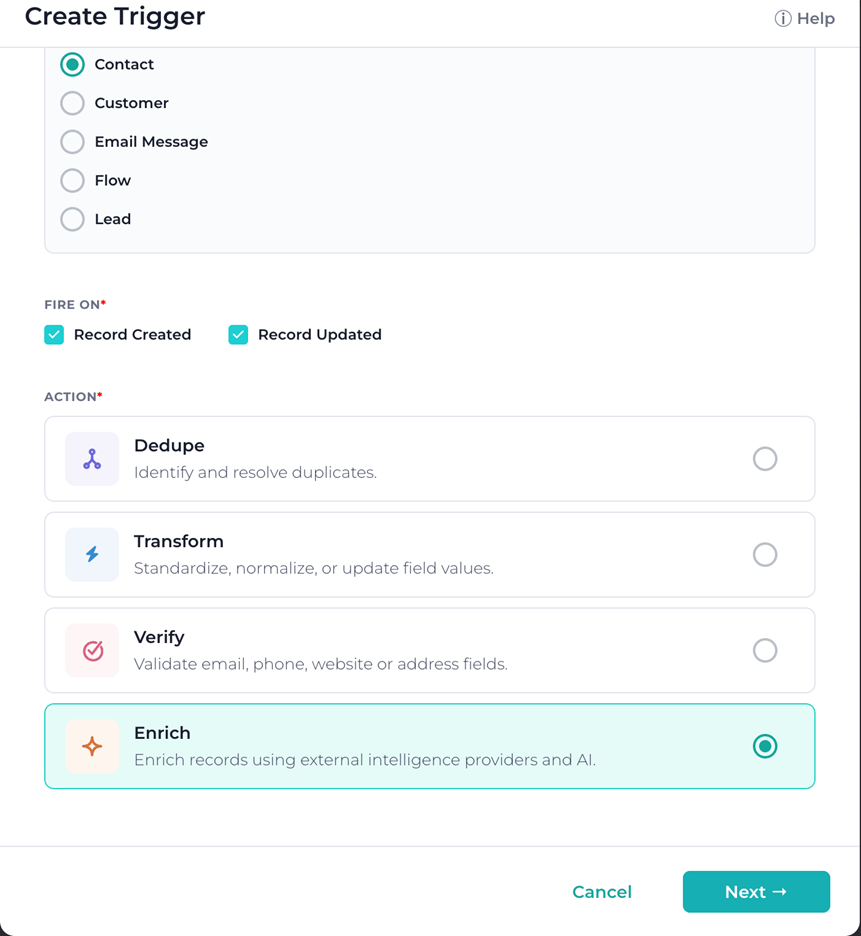
For organizations that have been pushing toward “clean on entry” instead of “clean on a schedule,” this closes the loop.
Match Confidence Transparency
If you’ve ever looked at two records with a data steward and seen a confidence score of 87, you know the next question by heart: “Okay, but why?” Until now, DataGroomr could give you a number. It couldn’t easily show you the math behind it.
That changes in this release. Match Confidence Transparency brings visibility to the matching engine and makes every score explainable at the field level – for both Classic and ML models – without requiring anyone to open a notebook or read documentation about the underlying algorithm.
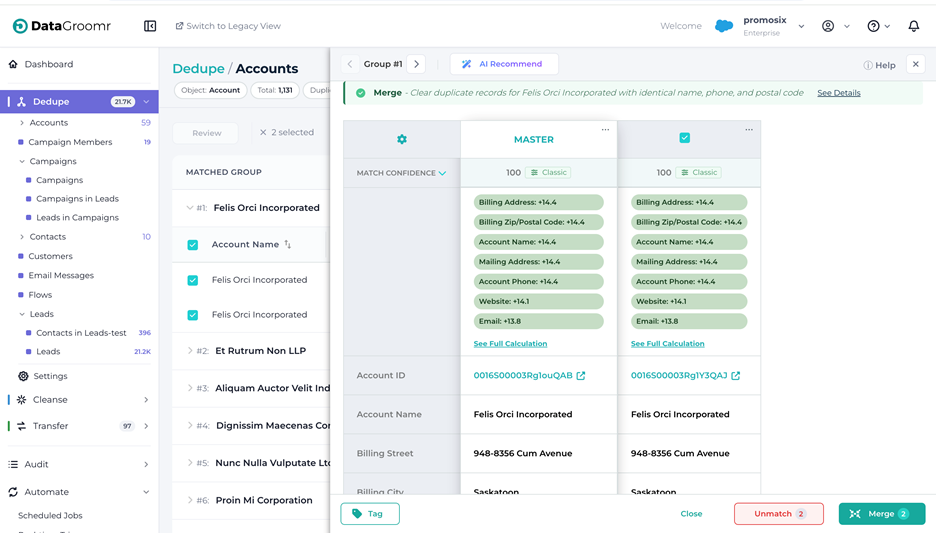
The experience is layered, so you can pick the level of detail you want:
- Quick check. Click the new chart icon next to a match score on any record, and a popover anchors to the icon showing the top three contributing fields. If more fields contributed to the score, they’re grouped into a “+ X more fields” pill so the popover stays scannable. This is the “I’m reviewing a queue, give me the gist” path.
- Across all records on screen. Click the expand chevron on the “Match Confidence” row in the fields list, and DataGroomr expands the row vertically for every record group currently visible. Each group gets its own match summary listing every field that influenced the score. This is the “I’m comparing groups and want a consistent view” path.
- Full calculation side panel. Click the “See Full Calculation” link in either of the above, and a side panel opens (similar to the AI Recommend panel) titled Match Confidence Details. This is the deep-dive view, and it’s built differently for Classic versus ML models:
3.1 For Classic models, you see a calculation table with columns for Field, Match Strength, Field Weight, and Impact, plus the total Match Confidence Score in the footer. It’s essentially the underlying weighted-sum calculation, exposed.
3.2 For ML models, you see Component, Match Strength, Model Weight, and Impact, with the Total Log-Odds and the final converted Match Confidence in the footer. The Sigmoid conversion from log-odds to probability is shown explicitly so you can follow the math from raw signal to final score.
Below the calculation table, a Preprocessing Applied section lists the cleaning steps the engine applied before comparing values – synonyms (“IBM” = “International Business Machines”), ignored words (company suffixes like “Inc.” and “LLC”), Western-name normalization, and so on. Crucially, this is shown as a human-readable list rather than as a configuration dump, so it’s usable by data stewards who aren’t fluent in matching internals.
Visual cues make the panel easy to read at a glance. Positive contributions appear in shades of green proportional to their weight (deeper green for stronger contributions, lighter green for smaller ones). Negative contributions and global penalties appear in light red with a minus sign. The chart icon next to each score is itself color-coded by model type, so users can tell immediately whether a score came from a Classic or ML model before they even click in.
What this changes in practice: data stewards can finally validate matching logic instead of accepting a total number on faith. When someone asks why two records merged – or why two obvious duplicates didn’t – there’s a defensible, field-by-field answer ready in two clicks. For regulated industries especially, that auditability matters.
A refreshed, more organized interface
The UI has been modernized to align with the new styling. You’ll notice the same signature teal, but the layouts feel cleaner, more spacious, and more visually consistent across modules. Importantly, none of this disrupts workflows you already know; -every action is in the same place, just easier on the eyes.
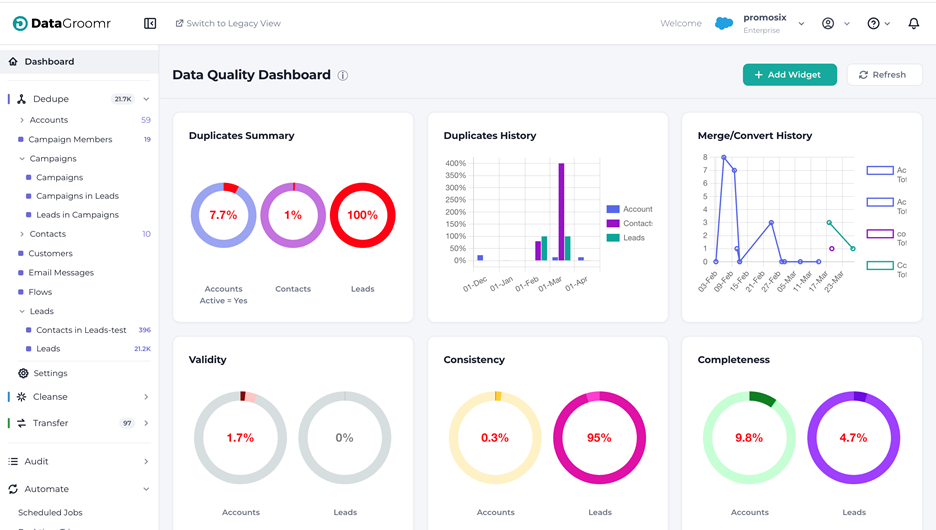
Beyond the visual refresh, two structural changes are worth calling out.
Folders, everywhere they belong
If you’ve ever scrolled through a long flat list of datasets trying to find “the one with the EMEA accounts,” this release is for you. Folders are now displayed throughout in navigationboth card view and list view, with consistent behavior across Dedupe, Cleanse, and Transfer.
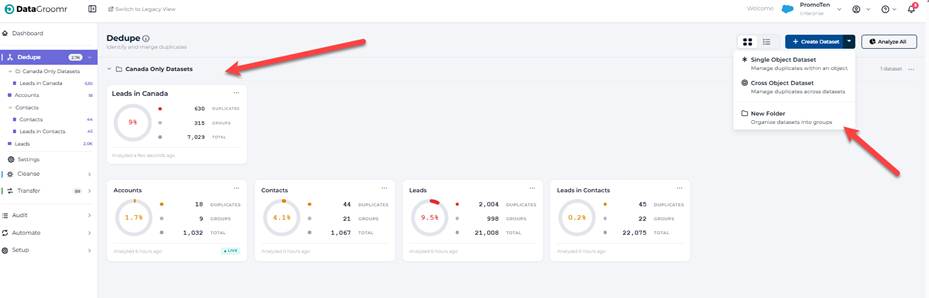
The previous folder model required toggling the entire sidebar into an editing state – a heavy UX for a frequent action. The new model integrates folders directly into the normal navigation flow:
- Always visible. Folders show up immediately when you open a module, no edit-mode toggle required.
- Collapsible. Click the chevron on any folder header to expand or collapse. Folder state persists within your session.
- Inline rename, delete, and create. A “⋯” menu on each folder opens Rename and Delete actions; rename uses an inline auto-focused input so you can just type the new name and press Enter. Creating a new folder is a menu item under the “+ Add dataset” button; it appears at the top of the folder list, immediately editable.
- Same structure across views. Switch between card view and list view, and the folder hierarchy carries with you. List view renders folders as collapsible group headers with a tinted background; card view renders them as collapsible card containers. No flattening, no surprises.
- Empty-folder placeholders. Empty folders now show a clear “Drag datasets here” placeholder in card view and a “0 datasets” row in list view, so it’s obvious where things belong.
It’s a small structural change with a real productivity impact for any team running 20+ datasets in a single module.
Streamlined matching models experience
In this release, all matching models – Classic and AI/ML, across every object – are now available in a single unified list, the same way rules already are. You can now view, sort, and manage your models in one place, making it easier to navigate across objects, compare variants, and keep your matching strategy organized as it scales. Creating a new model opens a step-by-step wizard:
1. Set up – pick the object and the model type
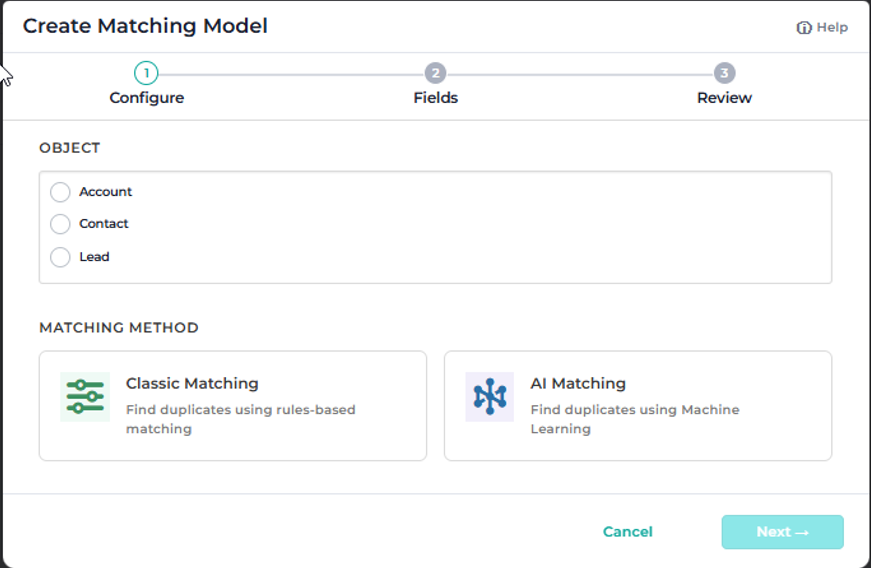
2. Fields – auto-select or manually choose the fields to match on
3. Save – the model name auto-generates based on your selections, and you can edit it before saving
4.Train – appears only for ML models, kicks off training
When you’re editing an existing model, the wizard steps disappear – you’ll see a simplified view with just Name and Fields, consistent with the current editing experience. The result: less clicking, fewer navigation levels, and a faster path from “I need a new model” to a working model.
Live Dedupe gets more robust at scale
Live Dedupe is one of the most popular capabilities in DataGroomr. In response to customers running Live Dedupe across larger, more dynamic datasets, we’ve strengthened its performance and reliability at scale.
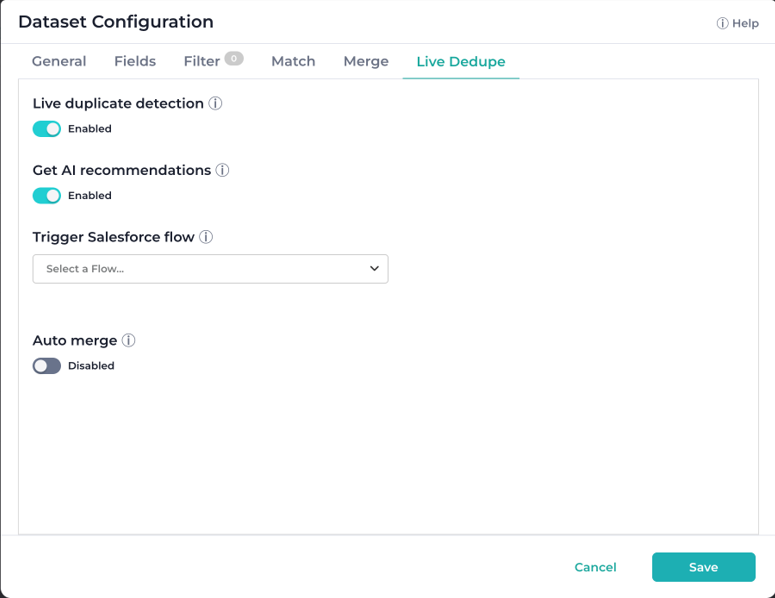
- Large-volume update handling. We enhanced DataGroomr’s event processing so Live Dedupe now keeps up with large update waves without delays. If you’ve been holding off on enabling Live Dedupe on a high-throughput dataset, this is the release to revisit that decision.
- Auto-rebuild on model update. When a matching model is changed at the model level (not just at the dataset level), the Live Dedupe index now rebuilds automatically. And if a real-time event happens to hit a stale index before the rebuild completes, the user-facing error explains what happened and recommends a full analysis instead of a generic “unexpected error.”
Taken together, these changes make Live Dedupe more honest about what’s happening underneath, more accurate at the edges, and faster under load. They’re the kind of fixes you only notice if you’re running at scale – but if you are, you’ll notice.
Smaller wins worth a mention
Releases this large always include a long tail of meaningful improvements that don’t fit a headline theme. A few worth calling out:
- Unified phone verification. The Basic / Extended toggle is gone. Every phone verification now returns full carrier, line type, and porting details – for a flat 2 credits. Credit estimation dialogs reflect the new cost. This means simpler pricing and consistently richer results.
- Prebuilt models for Cases and Email Messages. Service Cloud orgs accumulate duplicate cases and email messages at a steady clip – and unlike duplicate Accounts or Contacts, duplicate emails and cases quietly eat through Salesforce file and data storage, driving up storage costs without anyone noticing until the bill arrives. Adding the Email Message or Case object now creates best-practice matching models out of the box, and the custom merger has been extended to handle both object types correctly. Service Cloud teams can finally clean up duplicate cases and emails the same way they clean up Accounts and Contacts – recovering storage, reducing clutter in case views, and improving reporting accuracy in the process.
- Dedupe trigger action. A new Dedupe action joins the Triggers page. Pick the datasets and classic models to target, with the same configuration options as the dataset Live Dedupe tab.
- Split Export and Sync to Salesforce. In Dedupe and Cleanse, Export is now strictly the CSV file action, and a new Sync to Salesforce action handles direct sync of verifications and DQ results back to Salesforce. The export dialog has been updated to match. Two distinct intents, two distinct actions – no more wondering which option does what.
- Disable basic preprocessing. A new switch in matching models lets you turn off the auto-cleaning of special characters when matching on string fields where punctuation is meaningful (think product SKUs, codes, or identifiers where “ABC-123” genuinely is different from “ABC 123”).
Reliability and polish
Beyond the headline features and the smaller wins, this release includes a wide set of fixes spanning Dedupe, Cleanse, Transfer, Audit, Automate and Setup. A non-exhaustive list of areas touched:
- Rollback and restore reliability, specifically in NPSP household accounts
- Filter persistence – selected dataset filters are now carried over when mass action dialogs open, instead of being silently reset
- SOQL filter robustness – including support for nested semi-joins in cross-object datasets and correct handling when “Exclude Converted Leads” is enabled at the org level
- Audit and log browser detail – failed events now surface record IDs and detail, mass enrich events are correctly labeled, and search-by-ID works across all pages of the Undo dialog
- Sandbox-to-production parity – model promotion now preserves Contact.Account.ParentId and other reference fields that previously didn’t carry across
- UI consistency – alignment, spinner placement, dropdown positioning, table padding, tooltip sizing, empty-state arrows, and a long list of small details that add up to a noticeably calmer interface
Many of these fixes came directly from production telemetry and from customers who took the time to report issues through the support portal. Thank you! Please keep them coming.
Summary
The DataGroomr May’26 release represents a meaningful step forward across four dimensions at once: AI-powered enrichment becomes a first-class workflow with templates, dataset-level controls, native ZoomInfo and Apollo integrations, and real-time triggers; matching decisions become fully transparent with field-level breakdowns for both Classic and ML models; the user interface gets a cohesive refresh anchored by proper folder support and a streamlined matching models experience; and Live Dedupe gets meaningfully more reliable under high-volume, fast-changing conditions.
As always, every change is backward compatible. Your existing models, datasets, prompts, and automations keep working without missing a beat – and you can adopt the new capabilities incrementally, on whatever timeline works for your team.
Log in to your DataGroomr account to explore the new enrichment templates, try the Match Confidence panel on a real duplicate group, organize your datasets into folders, or connect ZoomInfo or Apollo. If you’d like a walkthrough or want help adapting these capabilities to your specific workflows, our team is happy to help. And you can always submit feature requests through our Ideas Portal or reach out at support@datagroomr.com.
Happy DataGrooming!