Salesforce data quality is too often treated as retroactive damage control. While errors pile up, admins are left spending countless hours correcting records after the fact, fixing problems that could have been prevented. A more sustainable approach is to structure Salesforce to encourage accurate proper data entry, to automate maintainance, and to distribute responsibility across teams. Salesforce becomes a reliable system of record when data quality is embedded into everyday processes instead of causing constant frustration when it requires manual remediation.
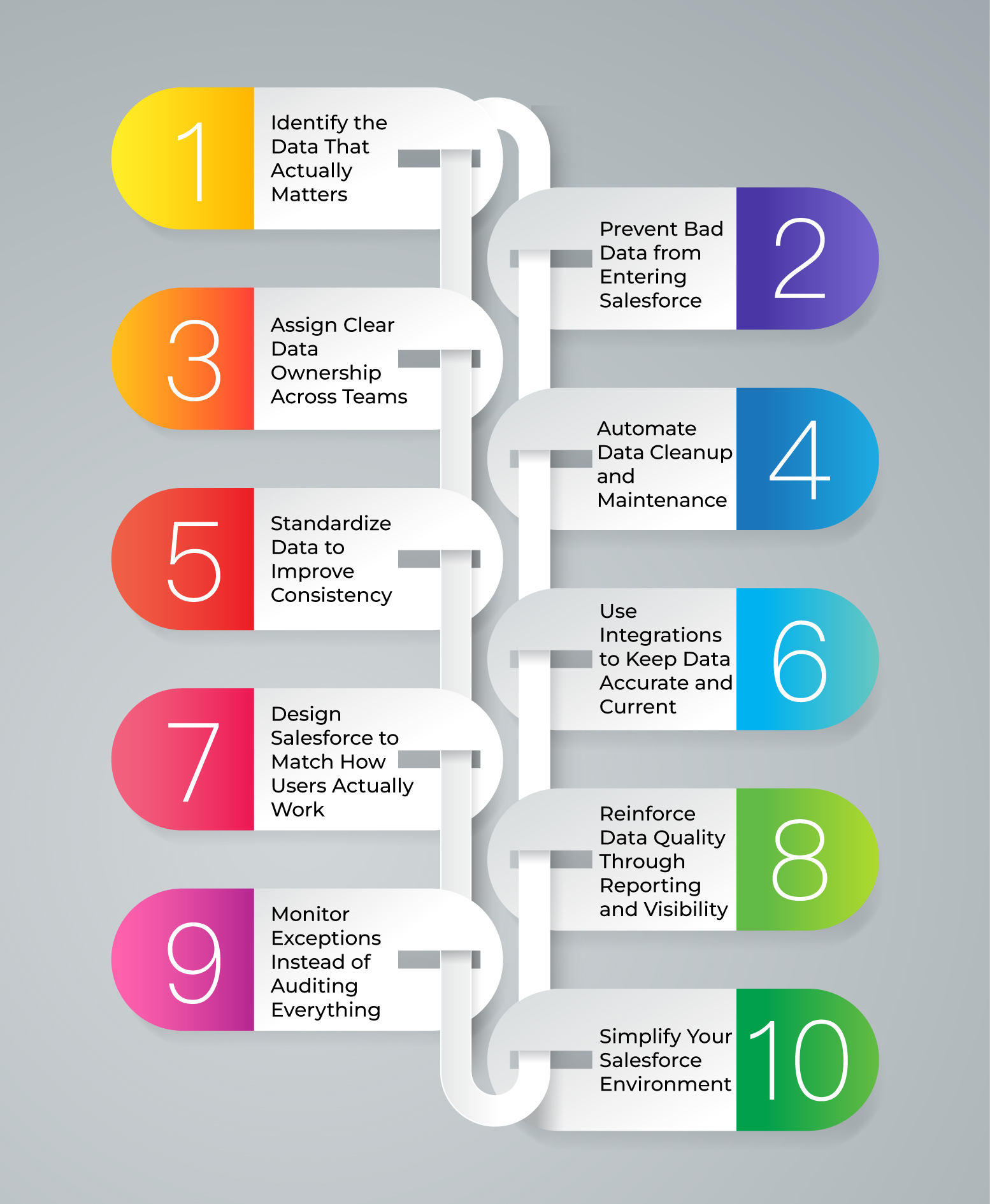
This guide will take you through ten steps you can take to improve Salesforce data quality without adding administrative workload.
Step 1: Identify the Data That Actually Matters
You should be clear on what data drives your business before you make any changes. While there may be consistent, regular use of decision-impacting fields, Salesforce orgs have a tendency to add additional fields over time, with only a small number of them being utilized. Begin by examining reports, dashboards, automations, and downstream systems to determine which fields drive forecasting, segmentation, handoffs, and performance tracking. These are the areas that need the best data quality. Involve stakeholders in sales, marketing and customer success to focus on priorities rather than making independent assumptions. It is easier and considerably less controversial to enforce it when everone agrees on what good data should look like.
Step 2: Prevent Bad Data from Entering Salesforce
Once your critical data requirements have been defined, drive prevention of mistakes at point of entry. Requirements that are too strict can slow down the flow of work and invite work arounds that are inaccurate, while requirements that are too loose can result in inconsistencies. Aim for finding a balance; demand just what is required and make the right way the easiest. Conditional required fields make sure that people are only asked for information when it’s pertinent to their work. Validation rules give an extra level of protection by enforcing logical consistency, e.g., stopping progress of opportunities when required information is missing. Such control is used to guide user action and minimizes constant data cleaning needs.
Step 3: Assign Clear Data Ownership Across Teams
Data quality is improved when ownership is explicit. There should be a clear owner of every critical data set in Salesforce, which is usually the team that creates or uses them the most. Sales teams are the best option to keep account, contact and opportunity data up-to-date. Marketing should controlg lead source and campaign-related fields. Customer success should manage retention, lifecycle and post-sale data. Ownership should be documented, enabled, onboarded and communicated throughout the organization. When teams recognize that the accuracy of data in Salesforce is directly tied to their reporting, compensation and visibility, they will be more invested in keeping it accurate.
Step 4: Automate Data Cleanup and Maintenance
Manual cleanup is not possible to sustain, especially when the volume of data scales. Automation allows you to address data issues on an ongoing basis as opposed to a reactive one. One of the most impactful automations is duplicate management since duplicates distort reporting and waste time. Duplicates can be identified and eliminated using matching rules and automatic de-duplication. Automation is also capable of determining the presence of stale records, determining undefined fields, and normalizing inconsistent values. These background processes provide an automated self-healing environment that improves with time, which doesn’t requires constant manual intervention.
Step 5: Standardize Data to Improve Consistency
Inconsistent data is one of the familiar reasons for unreliable reporting and brittle automation. First, audit fields that are frequently used in reports, integrations and searches, especially those that may introduce variability due to free-text entries. Replace free-text fields with picklists or controlled value sets to enforce consistency and reporting will become more reliable. In fields where flexibility is needed, it is best to use guided inputs or dependent picklists that allow users to select suitable values that don’t make them feel constrained. Clear documentation and field descriptions are also important to help users to know what each field represents and how it should be used. Thoughtful standardization means that ambiguity and problems are reduced before they can occur.
Step 6: Use Integrations to Keep Data Accurate and Current
Even the most disciplined users can’t maintain the accuracy of all records manually. Integrations with reliable external data sources assist in filling in gaps and ensuring records are up to date without user intervention. Firmographic data can be automatically updated to capture company changes, contact data can be validated, and account data can be refreshed to ensure it is up to date. Integrations lessen the need for manual updates and enhance completeness and accuracy of the entire system. Done carefully, data enrichment does not replace data provided by users but rather enhances it, creating a more sustainable and scalable database.
Step 7: Design Salesforce to Match How Users Actually Work
Salesforce data quality is compromised when the system doesn’t match real world workflows. Take time to analyze the way users navigate Salesforce throughout the day and notice where data entry seems clumsy or unnatural. Surface the most significant fields in page layouts, flows, and prompts at the right time, e.g., when changing stages or when passing from one team to another. Hide or delay nonessential fields to give users time to focus on what’s most important. When Salesforce is based on natural work patterns, proper data entry is easy and intuitive.
Step 8: Reinforce Data Quality Through Reporting and Visibility
Making data visual and meaningful is one of the best ways to increase the quality of data. Reports and dashboards should be quite reliant on the fields you expect to be properly maintained. When missing or incorrect data impacts pipeline views, conversion rates or performance metrics, users immediately feel the effects. Visibility creates accountability and motivation as opposed to enforcement. With time, teams begin to self-correct as they begin to see how access to clean data helps them better manage workloads, make better predictions and achieve results.
Step 9: Monitor Exceptions Instead of Auditing Everything
Instead of trying to track all records, try to focus on exceptions that are outside of your set standards. Data health dashboards can highlight records missing important data, deals that have not progressed, or accounts not being used. Alerts can be automated to inform relevant teams ofissues in critical stages. This is a more focused approach and allows admins to step in only when necessary to rectify any issues in a timely manner. Exception-based monitoring helps to change data quality management from constant monitoring to proactive intervention.
Step 10: Simplify Your Salesforce Environment
Over time, Salesforce orgs accumulate unused fields, obsolete workflows, and duplicate automations. This complicates proper data entry and increases the likelihood of errors. Review your Salesforce setup regularly, and eliminate anything that is no longer useful. Streamline page layouts, minimize unnecessary processes and target role-specific experiences. A simpler system is easier to use and manage and is more likely to deliver quality data on a regular basis.
Final Thoughts
Improving Salesforce data quality doesn’t require more administrative work, just improved design, smarter automation, and everybody’s responsibility. By focusing on prevention, standardization, and actua day-to-day workflows, organizations can build a Salesforce environment where clean data is the default. The reward is great: more credible information, more trust from users, and a system that does not restrict the business, but supports it.
Frequently Asked Questions (FAQ)
Improving data quality without annoying users begins with reducing friction in their daily operations. Rather than making most fields mandatory initially, concentrate on the information that really counts and gather it at appropriate times, with conditional logic. Optimize Salesforce layouts to align with real user working processes, and use automation, validation rules, and integrations to make sure things are consistent and to handle cleanup. When Salesforce supports users rather than imposes restraints, they are more inclined to input correct data.
Admins should not be the only ones to take care of Salesforce data quality. It should be a shared responsibility across the organization. Individual teams should be responsible for the data they generate and use the most. Sales should own account, contact and opportunity data. Marketing should own lead and campaign data, and customer success should own lifecycle and renewal data. Admins can facilitate data quality through system design and automation, but long-term success depends on effective ownership and responsibility at the team level.
Salesforce data should be automatically updated all the time with appropriate automation and monitoring, instead of periodic revamping. Deduplication can be automated; data hygiene operations and exception-based dashboards can help address issues when they emerge. Teams should also monitor data health on a regular basis, such as weekly or monthly, using dashboards and alerts to maintain data reliability without frequent data cleanups on a large scale.